The Settings menu
Every item of the Settings menu of the Hectare Mini — sound, language, diagram settings, date and time, alarm delay, product rate error, machine parameters, user — with its access level, range and default.
“MENU” on the home screen → “Settings”. The menu holds the general settings of the panel. Which items you see depends on the access level (Access levels) and on the machine in the profile.
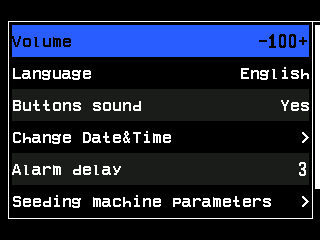
- “Volume” — the selected item.
- Its value between − and +. “PLUS” and “MINUS” change it on the spot.
- “Language”.
- “Buttons sound”.
- “Change Date&Time” — the arrow head opens a submenu.
- “Alarm delay”, in seconds.
- “Seeding machine parameters” — a submenu, from the Agronomist level.
- Scroll bar. “User” follows further down.
The panel stores every change by itself about one and a half seconds after the last change and the last touch of a button.
The items
| Item | Level | What it does | Range · default |
|---|---|---|---|
| “Volume” | Operator | Loudness of the alarm signal, in per cent. | 0 … 100, steps of 10 · 100 |
| “Language” | Operator | Language of the texts on the screen: English, Ukrainian, Polish, Hungarian, Romanian, Bulgarian or German. | · English |
| “Buttons sound” | Operator | A short beep at every touch the panel accepts. | “No” / “Yes” · “Yes” |
| “Seeding diagram settings” | Operator | How the seed diagram of the home screen is drawn — below. Shown only with a speed sensor and “Mode of seeding” at “Hybrid” or “Precise”. | submenu |
| “Fertil. diagram settings” | Operator | The same for the fertilizer diagram. Shown only with a speed sensor, fertilizer sensors and “Mode of fertilizers” at “Hybrid” or “Precise”. | submenu |
| “Liq.fert. diagram settings” | Operator | “Grid” of the liquid fertilizer diagram. Shown only with a speed sensor, liquid fertilizer sensors and “Mode of liq.fert.” at “By area”. | submenu |
| “Change Date&Time” | Operator | Date and time of the panel — Set the date and time. | submenu |
| “Alarm delay” | Operator | How long a fault must last before the alarm window opens — How alarms work. | 2 … 20 s · 3 s |
| “Product rate error,%” | Agronomist | Permitted deviation of the applied product weight from its target; beyond it the panel raises “Rate of Product 1 is to low!” or “Rate of Product 1 is to high!” (with the number of the product). Shown only when a product is dosed by weight, or with a liquid pump controller. | 3 … 20 % · 5 % |
| “Seeding machine parameters” | Agronomist | Working width, control modes, calibrations — Seeding machine parameters. | submenu |
| “User” | Operator | The access level — Enable the Agronomist level. | “Operator” … “Debug” |
| “Reset settings” | Service | Returns the values of this menu and of “Seeding machine parameters” to the factory values at once, without asking — including “Language” (English), “Width, cm”, the modes, the active field and the “GPS” setting of the profile. | — |
Diagram settings
The submenus “Seeding diagram settings” and “Fertil. diagram settings” hold the same items, each for its own diagram. When the fertilizer sensors run in “Precise”, they are treated as a second seed group, and the items are named “Seeding gr.A diagram” and “Seeding gr.B diagram”.
| Item | Level | What it does | Values · default |
|---|---|---|---|
| “Skips & Doubles” | Operator | Shows or hides the columns of skips and doubles over the last completed stretch. Only in “Precise”. | “No” / “Yes” · “Yes” |
| “Grid” | Operator | “No” — only the target rate line; “Partial” — only the limits of the permitted deviation; “Full” — both. | · “Full” |
| “Scale S&D,%” | Operator | Full height of a skips or doubles column, in per cent of the diagram height. Only in “Precise”. | 5 … 50 %, steps of 5 · 20 % |
| “Reset to defaults” | Service | Returns the three items above to their defaults. | — |
What the diagram shows: The section diagram.
Something your machine does that this page does not answer? Write to support@agriwelt.com — an engineer answers.