Set the alarm level of a grain drill
Let the Hectare Mini set the alarm level from the flow being applied, with one long press — or set it by hand — so that a line that loses flow is reported.
In the “Flow” mode the panel watches every line against an alarm level in seeds per second: a line whose flow drops below it is reported. Set too high, the columns sink under the line and the diagram shows “NOT UNDER CONTROL”; set too low, a partly blocked line goes unnoticed. The simplest way is to let the panel set it from the flow it sees.
Let the panel set it
Start seeding as usual, at working speed, and wait until the panel gives one short beep — it is now watching the seeding.
On the home screen, hold “BACK”. The panel gives one short beep.
Look at the rate fields. In the “Flow” mode each alarm level is now half the flow measured at that moment; in the “Hybrid” mode the target rate is set to the rate measured at that moment. The changed field is highlighted.
This works for the seed diagram, the fertilizer diagram and liquid fertilizer in “Flow”, all at once, but only while the panel watches the seeding. Standing still, or in the “Precise” mode, the long press does nothing.
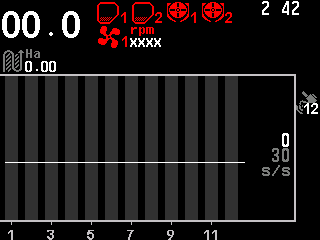
Set it by hand
Press “PLUS” or “MINUS” on the home screen: the first press selects the seed rate field, further presses change it by 1 s/s. “DOWN” and “UP” move to the fertilizer rate field. Details: Change the target rate.
Something your machine does that this page does not answer? Write to support@agriwelt.com — an engineer answers.