The Motors screen
One tile per dispenser motor and one symbol per tramline actuator — how to reach the screen, read the colours, take a motor out of control and open its settings.
The Motors screen shows the dispenser electric motors of the machine, one tile each, and the tramline actuators. It is the screen to look at when a row stops sowing and you want to know whether the motor is the reason. It has no heading: it carries only numbered motor and actuator symbols — no rates, no area, no speed.
It exists if the profile holds at least one seed motor, one fertilizer motor or one tramline actuator, and it is shown only above the Operator level — enable the Agronomist level first (Enable the Agronomist level). Then it follows the Statistics screen: three presses of “HOME” from the home screen. “HOME” goes on to the rate control screen; “BACK” returns to the home screen.
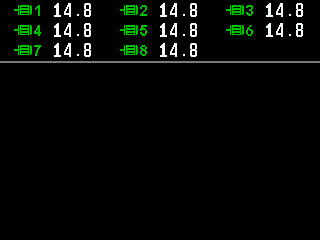
The seed motors stand in a bar at the top, numbered in the order of the profile. Below it a bar of fertilizer motors, if the machine has them — on a machine with more than twenty rows and no fertilizer motors, the second bar holds the second half of the seed motors. The tramline actuators stand below the bars. Beside each motor: the speed of the driven shaft in rpm; on machines with many motors it is left out so that all tiles fit.
Reading a motor tile
The colour of the symbol is the state. Symbol and sign alternate once a second while the state is not normal.
| Symbol | Value | State |
|---|---|---|
| Motor, green | the speed | Under control and driven. |
| Motor and STOP, yellow | the speed | In order, but application is off — at the headland, or locked by hand. Not a fault. |
| Motor, red | the speed | Alarm. The alarm window names the reason. |
| Motor and cross, red | XXX | No connection to the motor controller. Check its power supply and its cable and connectors. |
| Motor and ?, red | ??? | The device answering is not a motor controller, or the controller stayed in its update mode. |
| Motor struck through | !!! | Taken out of control: neither driven nor watched. |

Reading a tramline actuator
| Symbol | State |
|---|---|
| Pulled in or pulled out, grey, steady | It has reached that position. |
| Pulled in or pulled out, yellow, steady | It is moving there. |
| Pulled in and pulled out alternating, yellow | The position is not certain. |
| Red cross, blinking | No connection. |
| Red question mark, blinking | The device answering is not a tramline actuator. |
| Actuator symbol, red, blinking | The actuator reports an alarm. |
| Struck through, grey, blinking | Taken out of control. |
The position reached is grey, not green: only motors are green here.
Selecting a motor
Hold “MENU” to switch on the selection; it stands on the first motor, on a white background. “UP” and “DOWN” move through a bar and on into the next bar and the actuators. Then:
- “MENU” opens the context menu of the selected motor or actuator — Motor context menu.
- “MINUS” / “PLUS” take it out of or into control — Take a sensor into or out of control.
- “BACK” leaves the selection; a second “BACK” returns to the home screen.
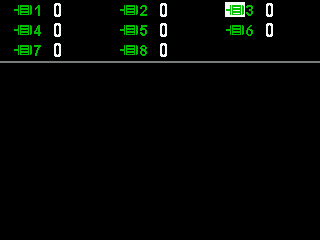
The service screen of the motors
The context menu item “Electric motors” (Service level) opens a screen for the service engineer: versions, motor type, target and actual speed, error code, voltages, temperature, current and sixteen state signs in the “Registers” view, and counters per field in the “Statistics” view. You do not need it for sowing.
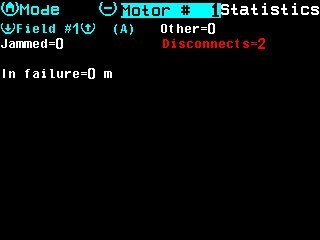
- Mode — “HOME” switches between the views.
- Motor number — “MINUS” and “PLUS” switch the motor.
- Name of the view.
- Field number — “UP” and “DOWN” switch it; (A) marks the active field.
- Counters — “Jammed”, “Disconnects” and “Other”. Above zero, red.
- In failure — distance driven with the motor in failure.
“BACK” leaves the screen. If the number belongs to no motor of the profile, “No data” appears.
Something your machine does that this page does not answer? Write to support@agriwelt.com — an engineer answers.