Hectare monitors
Hectare Mini
Compact seeding monitor for grain drills and planters
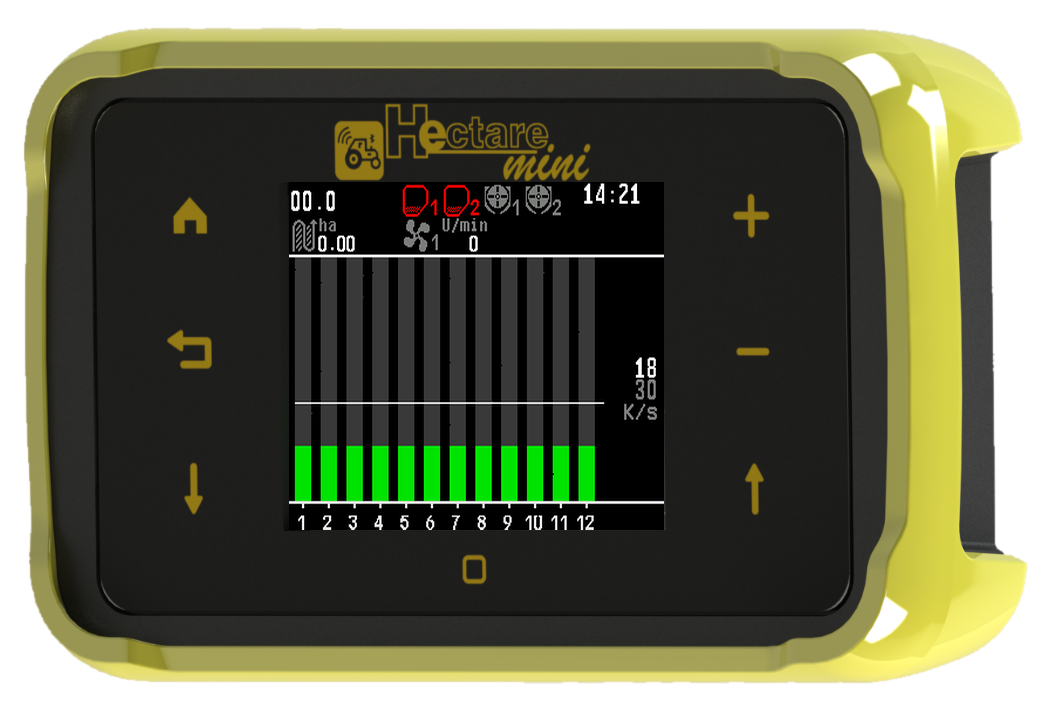
What the Hectare Mini system does → Whole manual on one page
Start here
- What the Hectare Mini system doesThe seeding control system with the Hectare Mini panel in one page — what it watches, what it drives, what it records, and who to ask.
- The panel and its seven buttonsWhat the Hectare Mini panel consists of, how it is mounted, and what each of the seven buttons does with a short and a long press.
- Switching on and offWhat the Hectare Mini shows after power-on, which screen and access level it starts with, and when it is safe to switch off.
- Screens, menus, context menus and windowsThe things everything on the Hectare Mini is done through — the working screens, the menus, the context menu of a device, the windows that ask or tell, and the access levels.
- The number padHow to type a number on the Hectare Mini — what the window shows, which buttons work, and the traps of an empty field and of values outside the range.
- Quick start — before and during the first passWhat to check before you drive into the field with the Hectare Mini, how the panel starts watching by itself, and what to look at during the first pass.
- Commissioning — setting up a new systemThe order in which a new Hectare Mini system is set up on a machine — from connecting the devices to the calibrations — with a link to the details of every step.
- About this manual and its picturesHow to read this manual — signal words, access levels, button presses — and what in the pictures belongs to the test bench and not to your machine.
The screens
- The home screenWhat every part of the Hectare Mini home screen is — speed, indicators, area, population, the diagrams and rate fields — and what you can do from it.
- Indicators of the home screen and their statesEvery indicator of the Hectare Mini home screen in every state — speed, hopper, dispenser shaft, fan, pressure, engine sensors, implement position, markers, tramline, clock, area, population and product rates.
- The section diagram — columns, lines and coloursHow to read the seed and fertilizer diagrams of the Hectare Mini in the "Flow", "Hybrid" and "Precise" modes, and what "NOT UNDER CONTROL" means.
- GPS reception and the GPS information screenHow the Hectare Mini takes the travel speed from its built-in GPS receiver, what the colour of the satellite icon means, and how to read the GPS information screen.
- The Seeding table screenThe readings of every seed line as figures, one row per line — which tables your machine has, what each column and colour means, and how to zero the readings.
- The Statistics screenThe report of the work on each field, block by block — and the menu that chooses the active field, shows the lifetime mileage and erases a field.
- The rate control screenThe screen for machines that apply products to a rate — what it shows, its three states, its colours, and how to reach the motors and their calibration from it.
- The Motors screenOne tile per dispenser motor and one symbol per tramline actuator — how to reach the screen, read the colours, take a motor out of control and open its settings.
How to…
- Change the target rate or the alarm levelRaise or lower the alarm level, the target rate in seeds per metre or the product rate in kg/ha — on the home screen or on the rate control screen.
- Set the alarm level of a grain drillLet the Hectare Mini set the alarm level from the flow being applied, with one long press — or set it by hand — so that a line that loses flow is reported.
- Lock product application by handStop the dispenser motors and the liquid pump with one long press, so that nothing turns while you work on the machine — and how the panel shows the lock.
- Take a sensor into or out of controlSwitch the watching of a single sensor, motor or actuator off and on with the sensor setup mode — what the panel asks, and when it wants the statistics erased.
- Zero the readings of the Seeding tableSet the counters and interval figures of the Seeding table to zero — what is zeroed, what is not, and what else zeroes them.
- Start work on a new fieldChoose the field the panel writes its statistics to, and erase it if it is not empty — before the first pass on a new field.
- Fill the disks with seedsTurn the seed disks of a planter with dispenser motors until every disk holds seed, so that sowing starts from the first metre — how to run it and read the result.
- Assign a product to a dispenser motorTell the panel which of its three products each dispenser motor applies, so that one target rate in kg/ha serves all motors of that product.
- Calibrate a dispenser motor by weightTell the panel how much product a motor-driven dispenser delivers per shaft turn — what you need, the steps on the screen, and what the failure messages mean.
- Set up the tramline rhythmTell the Hectare Mini on which bouts which actuator or motor shuts off — the limits, the rhythm editor, its dialogs, and the order that keeps your rhythm from being overwritten.
- Tramline in the field — bout indicator and next boutRead the tramline indicator, move to the next bout by hand or let the panel do it from the markers or the implement position, and recognise a line shut off for the tramline.
Setting up
- Access levelsThe three access levels of the Hectare Mini — Operator, Agronomist, Service — what each one opens, what happens to the alarms at the higher levels, and how to get back to Operator.
- Enable the Agronomist levelThe steps, with the screen of each, to raise the access level of the Hectare Mini to "Agronomist" or "Service" before changing settings, and to return to "Operator" afterwards.
- Check the profile and the connectionsThe first check after installing a Hectare Mini — does the profile match the machine, does every device answer, is every sensor under control — as a procedure with what the screen shows at each step.
- The profileWhat the profile of the Hectare Mini is, every item of the profile menu with its values, and the rules a profile must keep before the panel accepts it.
- Set up the profileThe steps to change the profile of the Hectare Mini — reach the profile menu at the Service level, enter the devices of the machine, save, and let the panel restart.
- The Settings menuEvery item of the Settings menu of the Hectare Mini — sound, language, diagram settings, date and time, alarm delay, product rate error, machine parameters, user — with its access level, range and default.
- Set the date and timeSet the clock of the Hectare Mini by hand, or let it follow the GPS receiver with a time zone.
- Seeding machine parametersThe submenu with the working width and the control modes of the Hectare Mini, what changing them does to the statistics, and where the two menu calibrations start.
- Sensor settingsHow to reach the settings of one sensor of the Hectare Mini, what every context menu holds, which settings are shared by a group, and which calibrations exist.
- The sensor status screenHow to read the status screen of a Hectare Mini sensor — type, unit, link, live figures and active alarms — and what each kind of sensor shows on it.
- Travel speed sensorEvery parameter of the travel speed sensor of the Hectare Mini — pulses, count period, wheel diameter, factor, seeding criteria, speed limits, imitation — with its range and default.
- Calibrate the speed sensorDrive a marked 100 m so that the Hectare Mini corrects the factor of the travel speed sensor — started from the Seeding machine parameters or from the context menu of the sensor.
- Seed and fertilizer sensorsThe settings of the seed sensors and the fertilizer sensors of the Hectare Mini — fraction for the crop, correction, error limits, recalculation path, percent of sowing — and when the panel starts to control the seeding.
- Let the panel calculate the recalculation pathLet the Hectare Mini work out the best "Recalculation,m" for skips and doubles from the target rate and the holes in the disk — with or without dispenser motors.
- Dispenser shaft sensorThe settings of a dispenser shaft sensor of the Hectare Mini — the period for "No rotation", the control of the shaft speed against the travel speed, and the control of the product weight — with ranges and defaults.
- Calibrate the dispenser rotationTurn the drive wheel so that the Hectare Mini learns how many dispenser pulses go with how many wheel pulses — needed before "Rotation speed control" can watch the shaft speed.
- Calibrate the dispenser by weightTurn the dispenser into a container and weigh it, so that the Hectare Mini knows how much product one turn of the shaft applies — needed for "Weight control".
- Fan sensorThe settings of a fan speed sensor of the Hectare Mini — minimum and maximum fan speed and pulses per revolution — and when the panel raises its alarms.
- Pressure sensorThe settings of a pressure (vacuum) sensor of the Hectare Mini — filter, minimum and maximum pressure — and when the panel raises its alarms.
- Hopper and work position sensorsThe hopper level sensor of the Hectare Mini, which has no settings, and the work position sensor with its transport signal and its alarm criterion.
- Engine sensors of the fan driveThe five sensors of a separate fan-drive engine on the Hectare Mini — ignition, emergency oil pressure, battery charge, low fuel, air filter — their two settings and how the ignition sensor gates the others.
- Marker sensorsThe two settings of the marker arm sensors of the Hectare Mini — which arm a single sensor watches, and which signal means "down".
- Device configurationWhat device configuration on the Hectare Mini is for, and how to prepare it — only the one device on the harness, the Agronomist level, the Sensors Configuration menu.
- Configure a seed sensorGive a new or replaced seed sensor of the Hectare Mini the number of its row — how to hold an open sensor, the three menu items, and the check afterwards.
- Configure a pressure sensorGive a new or replaced pressure sensor of the Hectare Mini its address — the three menu items and the check afterwards.
- Configure a HUB-8 concentratorSet the eight channels of a HUB-8 concentrator on the Hectare Mini — what each channel stands in for, and the shortcuts that fill all channels at once.
Alarms and troubleshooting
- How alarms workWhen the Hectare Mini raises an alarm, what the alarm window shows, how to close it, which messages are not alarm windows, and how the alarm topics of this manual are organised.
- Device does not answer: Connection lost, Wrong device type!The two alarms every sensor, motor or actuator of the Hectare Mini can raise — no answer from the device, or an answer from the wrong kind of device — and what to check.
- Travel speed: SLOWER, FASTER and speed sensor alarmsWhat to do when the Hectare Mini shows SLOWER or FASTER, when a speed sensor fails, or when the speed limits cannot be met.
- Seeding alarms: rate, skips, doubles, NOT UNDER CONTROLWhat to do when a seed or fertilizer line of the Hectare Mini sows too little or too much, has too many skips or doubles, sows into a tramline — or when the panel is not controlling at all.
- Seed sensor state: Clogged, Light struck, BrokenWhat to do when a seed or fertilizer sensor of the Hectare Mini reports that its optical channel is blocked, that it is blinded by sunlight, or that it has failed.
- Fan or dispenser shaft: speed alarmsWhat to do when the fan or a dispenser shaft of the Hectare Mini turns too slowly, too fast, or not at all.
- Hopper emptyWhat to do when the Hectare Mini reports that a hopper is empty.
- Pressure alarms: High pressure, Low pressureWhat to do when the vacuum measured by a pressure sensor of the Hectare Mini is too high or too low.
- Engine alarms: oil pressure, battery charge, fuel, air filterWhat to do when a sensor of the separate fan-drive engine of the Hectare Mini reports low oil pressure, no battery charge, low fuel or a dirty air filter.
- Dosing by weight: product rate too low or too highWhat to do when the Hectare Mini reports that a product dosed by weight is applied below or above its target rate, or cannot be dosed at all.
- User is Agronomist! Alarms will not be shown!The one window the Hectare Mini still shows at the Agronomist or Service level when seeding starts — what it means and how to get the alarms back.
- Tramline alarms: Illegal state, StallWhat to do when a tramline actuator of the Hectare Mini reports both end positions at once, does not reach its position, or when seed passes a line shut off for a tramline.
- Dispenser motor alarmsWhat the alarms of an electric dispenser motor of the Hectare Mini mean — voltage, temperature, short circuit, current, jamming — and what to check.
Reference
- The context menu of a dispenser motorEvery item of the context menu of a dispenser electric motor — what it sets, from which access level it is visible, and what "Reset to defaults" really resets.
- Buttons on every screenWhat each of the seven buttons does with a short and a long press — and where the screen takes touches — on the home screen, in menus, in windows and on every working screen.
- Terms used in this manualThe words of the Hectare Mini manual in one place — from active field and alarm level to singulation, spacing and tramline rhythm.