Set up the tramline rhythm
Tell the Hectare Mini on which bouts which actuator or motor shuts off — the limits, the rhythm editor, its dialogs, and the order that keeps your rhythm from being overwritten.
A tramline is the lane the sprayer will drive in later. You make it while sowing: the panel shuts off seed lines or motors on certain bouts — passes across the field. It counts the passes and starts again at the first after the last. The number of bouts and the list of which device shuts off on which bout make the rhythm. Example: four bouts, actuator 1 shutting off on bout 4 — every fourth pass leaves a tramline.
| Limit | Value |
|---|---|
| Rhythms stored | Three, one active at a time. Keep the patterns of the machines you work with. |
| Bouts in a rhythm | 1 to 50. |
| Tramline actuators | Four at most; the profile item “Tramline actuators” sets how many. |
| Cut-off bouts per device | Four. |
The panel knows nothing more: there is no setting for a starting side or for the width of the tramline. Which seed lines an actuator physically shuts off is set in “Relation of sensors to actuators” (Settings menu); without it the panel counts the bouts but shuts off nothing.
The item “Tramline” exists only if the machine has a tramline actuator, or as many seed motors as seed sensors, or as many fertilizer motors as fertilizer sensors. Setting up needs the Agronomist level (Enable the Agronomist level).
Press “MENU”, then open “Settings” → “Seeding machine parameters” → “Tramline”. Set “Tramline” to “Yes” with “PLUS”.
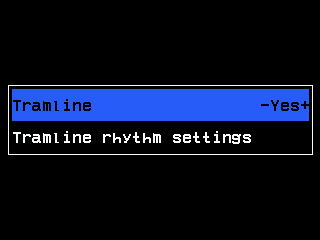
The Tramline submenu. Select “Tramline rhythm settings” and press “MENU”. The rhythm editor opens.
Choose the rhythm number with “PLUS” / “MINUS”, press “MENU” and choose “Select”. (“Active”) appears beside the number. Without this the rhythm is stored but not used.
Press “DOWN” to the number of bouts, press “MENU”, set “Bouts” with “PLUS” / “MINUS” and confirm with “MENU”.
Press “DOWN” into the empty row of a section and press “MENU”. Set the device number and the “Bout” on which it shuts off; confirm with “MENU”.
For further cut-off bouts of the same device, press “PLUS” to the cell with the “MENU” sign at the end of its row and press “MENU” — up to four.
Press “BACK”, or hold “HOME”. The rhythm is saved.
The rhythm editor
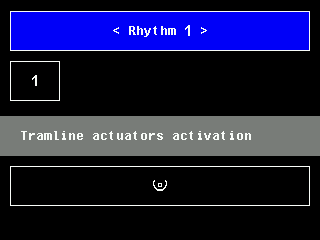
Read it top down: “Rhythm” with its number between arrows and (Active) if it is in use; under it the number of bouts in a box; then up to three sections — “Tramline actuators activation”, “Tramline motors activation”, “Tramline fert. motors activation” (with both modes “Precise”: “Tramline motors gr.A activation” and “Tramline motors gr.B activation”). Each row names a device — “Actuator”, “Motor”, “Fert.mot.” — and the bouts on which it shuts off; a cell with the “MENU” sign adds a bout or a row. A selected cell is white on blue.
| Button | What it does |
|---|---|
| “UP” / “DOWN” | One row up or down, across the sections. |
| “PLUS” / “MINUS” | On the rhythm number: next / previous rhythm. In a row: one cell right / left. On the number of bouts: nothing — open it with “MENU”. |
| “MENU” | Opens the dialog of the selected cell. |
| “BACK” | Saves and returns to the “Tramline” menu. |
| “HOME” held | Saves and returns to the home screen. A short press does nothing here. |
The dialogs
- Rhythm number: “Select” makes it the one in use; “Reset rhythm settings” deletes its rows and sets its bouts to 1.
- Number of bouts: lowering it deletes entries for bouts that fall away; a row left with no bout disappears. If the current bout was above the new number, counting restarts at 1.
- Row of a device: the device number and “Remove”. Numbers already used in the section are skipped — read the value, do not count presses.
- Bout of a row: “Bout”, “Remove bout” and “Remove all bouts”. Bouts already in the row are skipped. If every bout is already entered, “Unused bouts are not found!” appears instead; any button closes it.
What is stored where
The three rhythms, the number of bouts, the current bout, “Tramline” and “Auto-switching” belong to the settings of the panel and are stored by themselves shortly after the last touch. The profile holds only how many devices there are; on opening, the editor clears rows for which the profile has no device. With “Tramline” at “No”, all actuators and motors return to sowing.
Working in the field: Next tramline bout.
Something your machine does that this page does not answer? Write to support@agriwelt.com — an engineer answers.