Seed and fertilizer sensors
The settings of the seed sensors and the fertilizer sensors of the Hectare Mini — fraction for the crop, correction, error limits, recalculation path, percent of sowing — and when the panel starts to control the seeding.
The seed sensors share one set of settings: change it on any seed sensor and it applies to all. The fertilizer sensors share a second set. Only “Product application” is set line by line. Open the context menu of any sensor of the group as in Sensor settings.
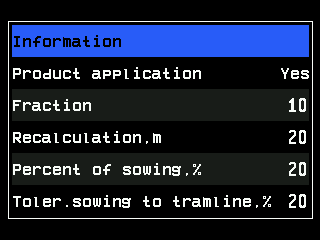
| Parameter | Level | What it does | Range · default |
|---|---|---|---|
| “Product application” | Agronomist | “Yes”: this line sows and is watched. “No”: the line is treated as shut off, like a line in a tramline bout — seed through it raises “Seeding to tramline”. Not shown when every line of the group has its own motor. | “No” / “Yes” |
| “Sensitivity” | Agronomist | Sensitivity of a seed sensor of an older generation. Shown only when such a sensor is connected. | 1 … 120 · 80 |
| “Fraction” | Operator | The count filter of the sensors, set for the size of the seed — a filter against dust and chaff. Change it with the crop — table below. | 1 … 100 · 10 |
| “Correction” | Operator | Adapts the sensitivity to the bracket of the sensor. A higher value lowers the sensitivity and keeps dust and fine dirt out of the count. Shown only for the sensor generation that uses it. | 100 … 3300 · 300 |
| “Rate error,%” | Agronomist | Permitted deviation of the measured rate from the target; beyond it “Under allowable rate” or “Over allowable rate”. Only in “Hybrid” and “Precise”. | 5 … 95 % · 50 % |
| “Doubles error,%” | Agronomist | Above this share of doubles: “High % of doubles”. “No” switches the alarm off. Only in “Precise”. | “No”, 1 … 95 % · “No” |
| “Skips error,%” | Agronomist | Above this share of skips: “High % of skips”. “No” switches the alarm off. Only in “Precise”. | “No”, 1 … 95 % · “No” |
| “Recalculation,m” | Operator | The stretch over which skips, doubles and quality are collected for the diagram and the Seeding table. Without a speed sensor it is “Recalculation,sec”, in seconds. “MENU” on it lets the panel calculate it — Let the panel calculate the recalculation path. | 10 … 50 · 20 |
| “Percent of sowing,%” | Agronomist | The share of sowing lines the panel needs before it starts to control the seeding — below. Seed sensors only; not shown on machines with dispenser motors. | 5 … 80 %, steps of 5 · 20 % |
| “Toler.sowing to tramline,%” | Agronomist | How much seed may still pass a line shut off for a tramline, in per cent of the target rate, before “Seeding to tramline”. | 0 … 50 % · 20 % |
| “Group start address” | Service (seed), Agronomist (fertilizer) | Where the numbering of this group starts in the sensor network. Leave it at “AUTO” unless the service tells you otherwise. | “AUTO”, … |
In “Flow” mode a line is in alarm only when it stays below the alarm level; there is no upper limit. The target rates and alarm levels themselves are set on the home screen — Change the target rate.
Fraction for the crop
Go by the size of the seed:
| Crop | “Fraction” |
|---|---|
| Rapeseed | 1 – 5 |
| Wheat | 5 – 10 |
| Maize | 10 – 30 |
| Sunflower | 10 – 30 |
On pneumatic drills set 1 whatever the crop. Too high a fraction makes small seeds disappear from the count — the panel then reports too low a rate.
When the panel controls the seeding
The panel starts to watch the seeding — and to raise seed alarms — only when seed flows within the target rate through at least “Percent of sowing,%” of the seed lines, and, if “Seeding criteria” of the speed sensor is “Yes”, the machine moves (Travel speed sensor). Until then the diagram shows “NOT UNDER CONTROL” — see Seeding alarms. With a work position sensor whose “Alarms criteria” is “Yes”, nothing is watched in the transport position (Hopper and work position sensors).
The status screen
Shows Status: with the state of the sensor — “Working”, “Clogged”, “Light struck” and the others: The sensor status screen.
Something your machine does that this page does not answer? Write to support@agriwelt.com — an engineer answers.