Set up the profile
The steps to change the profile of the Hectare Mini — reach the profile menu at the Service level, enter the devices of the machine, save, and let the panel restart.
Set up the profile when the equipment of the machine changes — a device added, removed or of another kind. The items and their limits: The profile. The profile menu needs the “Service” level.
Connect all devices to the panel and power them as the wiring diagram in the data sheet of the system shows.
Switch the panel on. After the splash screen the home screen appears; what it shows depends on the present profile.
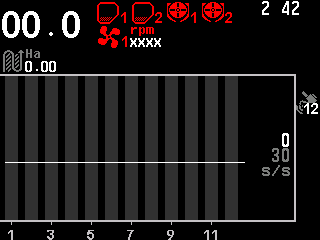
The home screen after start-up. Raise the access level to “Service”: “MENU” → “Settings” → “User” → “Service”, “MENU”, PIN — as in Enable the Agronomist level.
Press “BACK”. The main menu returns, now with “Service”.
Select “Service” and press “MENU”. The “Service” menu opens with “Profile” as its first item.
Select “Profile” and press “MENU”. The profile menu opens.
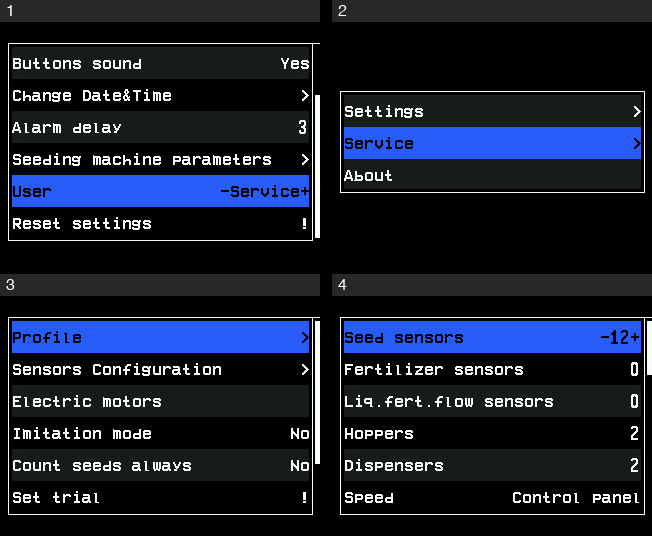
The way to the profile: Settings with the Service level, the main menu, the Service menu, the profile menu. Go through the items with “UP” / “DOWN” and set each with “PLUS” / “MINUS” to the equipment of the machine.
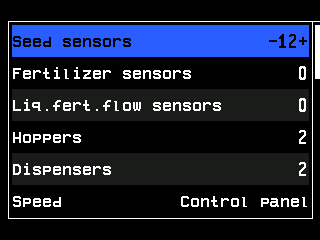
The profile menu. Select “Save profile”, the last item, and press “MENU”. The panel asks “Are you sure?” — press “PLUS” for “Yes”, “MINUS” for “No”.
The panel asks you to wait, then shows “Saved” and “Restart system”, and restarts by itself. The new profile is in force after the restart.
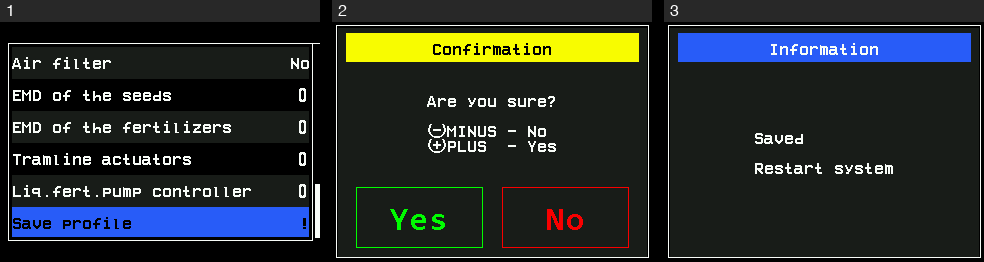
Saving the profile: the item Save profile, the question, then the message Saved and Restart system.
“BACK” leaves the profile menu; the device numbers you changed are not saved. “GPS” is the exception: it is stored at once, like a setting of the “Settings” menu.
When the profile is not saved
| The panel shows | Meaning |
|---|---|
| “No changes” | The profile is the same as the stored one. Nothing is saved, nothing restarts. |
| “Invalid profile!” | The profile breaks a rule — too few seed sensors, too many small indicators, too many fans and pressure sensors, or motors without a speed sensor. See Rules the profile must keep. Correct it and save again. |
After the restart the panel is at the “Operator” level. Check the result as in Check the profile and the connections, then, if the machine makes tramlines, set up the tramline rhythm — always after the profile — Set up the tramline rhythm.
Something your machine does that this page does not answer? Write to support@agriwelt.com — an engineer answers.