Set the date and time
Set the clock of the Hectare Mini by hand, or let it follow the GPS receiver with a time zone.
The panel stamps the start and end of the work on every field with its clock, and shows the time on the home screen. “Change Date&Time” is in the “Settings” menu at the “Operator” level. What it opens depends on the “GPS” item of the profile.
With GPS in the profile
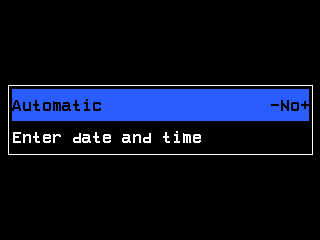
- “Automatic” — whether the clock follows the GPS receiver.
- Its value, here “No”. Change it with “PLUS” / “MINUS”.
- “Enter date and time” — opens the menu for setting the clock by hand. Shown while “Automatic” is “No”.
- “Automatic” at “Yes”: the clock takes the time from the GPS receiver. The item “Time zone” appears instead of “Enter date and time” — set your offset from UTC with “PLUS” / “MINUS”, from −12:00 to +14:00 in whole hours.
- “Automatic” at “No”: select “Enter date and time” and press “MENU”, then go on as below from step 2.
By hand
“MENU” → “Settings” → “Change Date&Time”, press “MENU”. Without GPS in the profile the menu opens with “Year”, “Month”, “Day”, “Hours”, “Minutes”, “Seconds” and “Set”.
Select an item with “UP” / “DOWN” and change it with “PLUS” / “MINUS”. “MENU” on a number — all items but “Month” — opens the number pad.
Set all six items. After a change of the month, a day that the month does not have is pulled back to its last day.
Select “Set” and press “MENU”. The clock takes the new date and time, and the menu you came from returns.
“BACK” leaves without changing the clock. Every item opens with the present date and time, so you only change what is wrong.
Something your machine does that this page does not answer? Write to support@agriwelt.com — an engineer answers.