Quick start — before and during the first pass
What to check before you drive into the field with the Hectare Mini, how the panel starts watching by itself, and what to look at during the first pass.
This assumes the system has been commissioned — see Commissioning. Before the season the speed sensor must have been calibrated, and the dispensers too if their shaft speed or the seed weight is to be watched (Speed sensor, Sensor settings).
Before the field
Switch the panel on and wait for the home screen.
Press “HOME” twice to open the Statistics screen. Check that the right active field is selected; on a new field, select an empty one or erase it — Start a new field.
Back on the home screen, set the alarm level of the seed diagram with “PLUS” / “MINUS” — or, in the “Hybrid” and “Precise” modes, the target rate. “DOWN” moves to the fertilizer diagram. See Change the target rate.
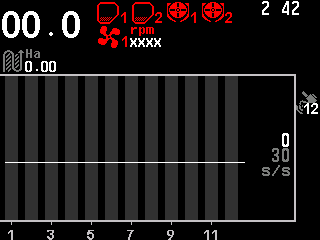
The seed diagram with the alarm level in s/s and its control line. If products are applied by weight, set their rates in kg/ha the same way.
Check the settings that change with the work — in the sensor setup mode (Take a sensor into or out of control), each sensor separately: “Period, s” of each dispenser shaft sensor; “Minimum, rpm” and “Maximum, rpm” of each fan; “Minimum, Pa” and “Maximum, Pa” of each pressure sensor; “Fraction” and “Correction” of the seed sensors and of the fertilizer sensors. All seed sensors share one set of settings, all fertilizer sensors another; every other sensor has its own.
Make sure the access level is “Operator”. At a higher level no alarm windows are shown, and the panel warns you with an alarm if you start seeding. Switching off and on returns to Operator.
Seeding
Just start. There is nothing to switch on: the panel starts watching the alarms by itself, with one short beep, once these conditions have held for the “Alarm delay” (3 s by default):
- application is not locked by hand (Lock application by hand);
- with an implement position sensor under control: the drill is in the working position;
- with dispenser motors or a liquid pump: the drill moves, and the speed sensor is under control and shows a speed;
- otherwise: at least “Percent of sowing,%” (20 % by default) of the lines under control are sowing — and, with “Seeding criteria” set at the speed sensor, the drill moves.
When a condition fails, the watching stops at once with three short beeps. There is no separate alarm for a drill that moves while no seed arrives: then the watching does not start and the beep does not come.
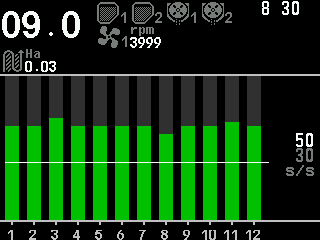
During the first pass, check
- the speed against the tractor's speedometer or a GPS navigator;
- the fan speed and the pressure — within their limits, not red;
- the seed columns above their line, and the seed rate against the target in the “Hybrid” and “Precise” modes;
- the fertilizer columns above their line;
- the product rate in kg/ha against the target;
- no red on any other indicator — Indicators.
If the speed sensor fails, the speed can be imitated in its settings until it is repaired (Speed sensor). When an alarm appears, stop and clear the fault — How alarms work. The quality of the last stretch is on the Seeding table; the result for the whole field on the Statistics screen.
Something your machine does that this page does not answer? Write to support@agriwelt.com — an engineer answers.