Dispenser shaft sensor
The settings of a dispenser shaft sensor of the Hectare Mini — the period for "No rotation", the control of the shaft speed against the travel speed, and the control of the product weight — with ranges and defaults.
A dispenser shaft sensor counts the turns of the metering shaft. At the least it tells you that the shaft has stopped. Calibrated, it also watches the shaft speed against the travel speed, or counts the weight of product applied. Each dispenser sensor has its own settings — set every one.
Open its context menu as in Sensor settings.
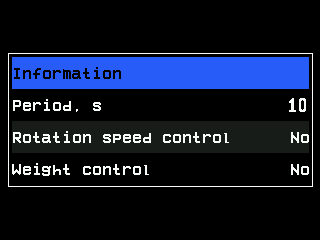
| Parameter | Level | What it does | Range · default |
|---|---|---|---|
| “Dispenser calibration(weight)” | Operator | Starts the calibration by weight — Calibrate the dispenser by weight. Shown only with “Weight control” at “Yes”. | — |
| “Period, s” | Operator | The longest time between two pulses of the sensor. If the shaft gives no pulse for longer while the machine sows or moves, the panel raises “No rotation”. | 1 … 60 s · 10 s |
| “Rotation speed control” | Agronomist | “Yes”: the shaft speed is watched against the travel speed, within “Maximum error, %”. “No”: only whether the shaft turns at all. Needs the rotation calibration. | “No” / “Yes” · “No” |
| “Wheel, pulses” | Agronomist | Pulses of the speed sensor that go with “Dispenser pulses” of this sensor. Written by the rotation calibration. Shown with “Rotation speed control” at “Yes”. | 1 … 65535 · 100 |
| “Dispenser pulses” | Agronomist | Pulses of this sensor that go with “Wheel, pulses”. Written by the rotation calibration. | 1 … 65535 · 100 |
| “Maximum error, %” | Agronomist | Permitted deviation of the shaft speed; beyond it, while the machine moves, “Low speed of rotation” or “High speed of rotation”. | 1 … 50 % · 10 % |
| “Weight control” | Agronomist | “Yes”: the panel counts the weight of product applied per hectare from the turns of this shaft. Needs the calibration by weight. | “No” / “Yes” · “No” |
| “Type of product” | Agronomist | Which product this dispenser applies: “Product 1”, “Product 2” or “Product 3”. Shown with “Weight control” at “Yes”. | · “Product 1” |
| “Weight, gr” | Agronomist | Weight of product that goes with “Weight, pulses” — together the output of the metering unit per turn. Written by the calibration by weight. | 1 … 65535 · 10000 |
| “Weight, pulses” | Agronomist | Pulses of this sensor that go with “Weight, gr”. | 1 … 65535 · 100 |
Without a speed sensor in the profile the panel can only watch whether the shaft turns: the speed and weight items are hidden.
Type of product
The panel follows up to three products by weight. Dispensers that apply the same product get the same number:
| Machine | Setting |
|---|---|
| One dispenser sensor | “Product 1”. |
| Two dispensers, the same seed | “Product 1” on both. |
| Two dispensers, seed and dry fertilizer | “Product 1” on the seed dispenser, “Product 2” on the fertilizer dispenser. |
| Three dispensers, two for seed, one for fertilizer | “Product 1” on the two seed dispensers, “Product 2” on the third. |
A product already dosed by an electric motor cannot be chosen here; the panel skips to the next free one. If no product is free, “Weight control” stays at “No”.
The status screen
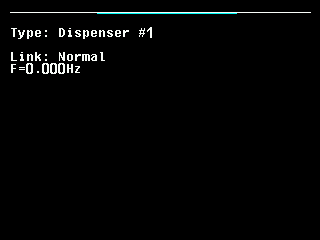
Shows the pulse frequency F= in Hz, to three decimals — The sensor status screen.
Something your machine does that this page does not answer? Write to support@agriwelt.com — an engineer answers.