Configure a pressure sensor
Give a new or replaced pressure sensor of the Hectare Mini its address — the three menu items and the check afterwards.
Each pressure sensor of the profile answers on its own address; the first pressure sensor has the first address of the range, the second the next, and so on. “New address” offers only the addresses of that range. Ask the service which one your sensor needs if you are not sure. Prepare first as in Device configuration: only this sensor on the harness, “Agronomist” level, “Sensors Configuration” menu open.
In “Sensors Configuration” select “Pressure sensor” and press “MENU”. The menu has three items: “Sensor address”, “New address” and “Set”.
Leave “Sensor address” at “AUTO”.
Select “New address” and set the address with “PLUS” / “MINUS”. It opens at the first address of the range, the one of pressure sensor 1.
Select “Set” and press “MENU”. The panel answers “Done”.
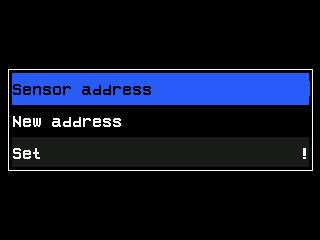
The Pressure sensor menu (the address is covered in this manual). Disconnect the sensor and connect it again. Return to the home screen with “BACK”. The pressure sensor must report back; while a pressure sensor is missing, its indicator shows a red cross and XXXX.
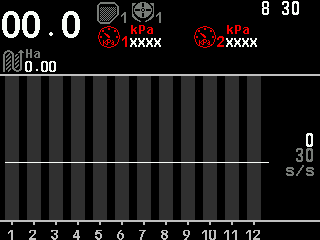
The home screen while the pressure sensors are not plugged in.
When all devices are done, return to “Operator” — set “User” back in “Settings”, or switch the panel off and on — and reconnect all devices.
Hold “MENU” on “Sensor address” to search for a pressure sensor on the harness, as described for the seed sensor — Searching for a sensor. The error messages: The rules of every configuration.
Something your machine does that this page does not answer? Write to support@agriwelt.com — an engineer answers.