Calibrate the dispenser by weight
Turn the dispenser into a container and weigh it, so that the Hectare Mini knows how much product one turn of the shaft applies — needed for "Weight control".
With “Weight control” at “Yes”, the panel counts the product applied from the turns of the dispenser shaft (Dispenser shaft sensor). The calibration measures the weight per pulse and writes “Weight, gr” and “Weight, pulses”. It is done at the “Operator” level, standing.
You need a container, scales and a way to turn the dispenser shaft by hand.
On the home screen hold “MENU”, select the dispenser sensor and press “MENU”. The context menu opens.
Select “Dispenser calibration(weight)” and press “MENU”. The calibration screen shows the target rates of the products in use — the product of this dispenser between arrows — and “PLUS - calibrate dispenser 1” with the number of the dispenser.
Press “PLUS”. The panel lists what to do before the calibration: weigh the empty container and write the weight down; fill the hopper; put the empty container under the dispenser; turn the rotor until its cells are filled. Do all of it, then press “UP”.
The next screen lists the calibration itself and counts the “Impulses” from the sensor: empty the container, put it back under the dispenser, and turn the rotor, filling the container — as much as possible, between 2 kg and 60 kg.
As soon as more than ten pulses have been counted, the line “MINUS - complete calibration” appears. Go on turning until the container holds as much as you can manage — at least 100 pulses and 5 kg give a good result. Then stop.
Press “MINUS”. The number pad opens: “Enter the difference of the filled and empty container in grams”.
Weigh the full container, subtract the empty weight, type the difference in grams (2000 to 60000) and touch “OK”. The panel stores the values and returns to the first screen.
Press “BACK” to leave.
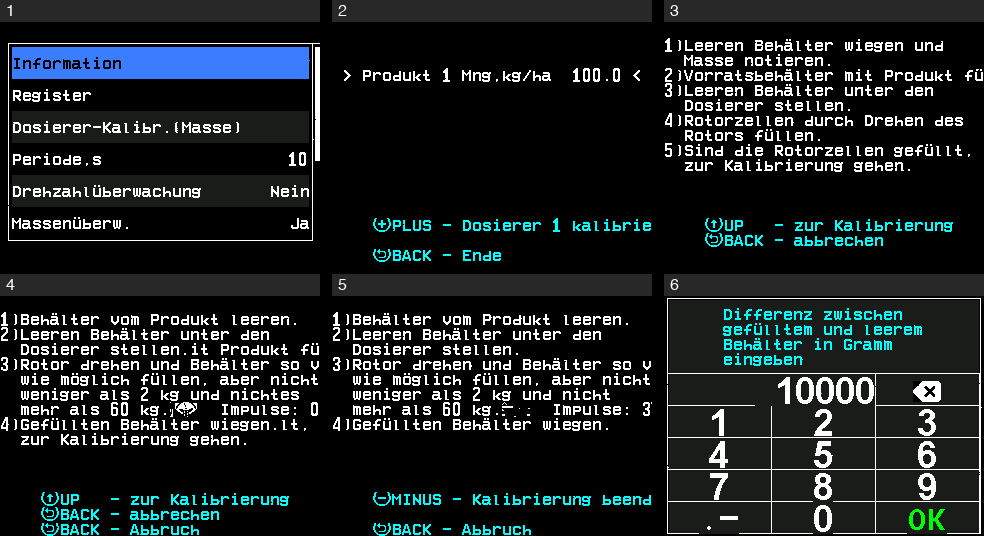 Screen shown in German
“BACK” on the list before the calibration cancels it. “BACK” during the calibration asks “Are you sure?” — “PLUS” cancels, “MINUS” goes on. “BACK” on the number pad keeps the old values.
When it does not start or stops
“PLUS” in step 3 works only while the sensor is under control, answers and has no alarm. Otherwise the first screen names the reason — “Not controlled”, “No connection” or “FAILURE”. If the sensor fails during the calibration, the panel shows “FAILURE” with the reason; “BACK” returns to the first screen.
Something your machine does that this page does not answer? Write to support@agriwelt.com — an engineer answers.