Hopper and work position sensors
The hopper level sensor of the Hectare Mini, which has no settings, and the work position sensor with its transport signal and its alarm criterion.
Hopper level sensor
The hopper sensor reports when the product in the hopper falls below the height at which the sensor is mounted. It has no settings: its context menu holds only “Information” (and “Reset to defaults” at the Service level, which has nothing to reset).
The status screen shows Pin: with the level on its input: "1" — the hopper is empty at the sensor, and the panel raises “Hopper empty”; "0" — product covers the sensor. See Hopper alarms.
Work position sensor
The work position sensor tells the panel whether the implement is lowered in the working position or raised in the transport position. Open its context menu as in Sensor settings.
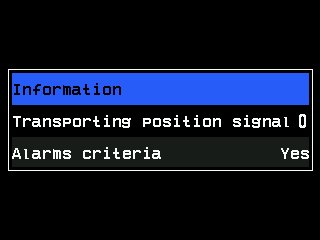
| Parameter | Level | What it does | Values · default |
|---|---|---|---|
| “Transporting position signal” | Agronomist | The level on the input that means transport position: 0 or 1. Set it to what the sensor gives with the implement raised. | 0 / 1 · 0 |
| “Alarms criteria” | Agronomist | “Yes”: in the transport position the panel does not watch the seeding, and the fan minimum, the pressure limits and the dispenser shafts are not watched on the move — no alarms at the headland. “No”: the position is only shown; it does not affect the alarms. Hidden, and always “Yes”, on machines with dispenser motors or a liquid pump controller. | “No” / “Yes” · “Yes” |
On a machine with dispenser motors, a work position sensor that does not answer counts as transport position — for safety, nothing is dosed. Without motors, a sensor that does not answer or is out of control counts as working position.
The status screen shows “Position: Working” or “Position: Transporting”, and Pin: with the level on the input — compare it with the real position when you set “Transporting position signal”. The position changes after a short filter, so a bump does not toggle it.
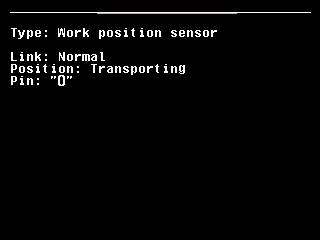
On the home screen the implement indicator blinks yellow in the transport position — see Indicators.
Something your machine does that this page does not answer? Write to support@agriwelt.com — an engineer answers.