Configure a HUB-8 concentrator
Set the eight channels of a HUB-8 concentrator on the Hectare Mini — what each channel stands in for, and the shortcuts that fill all channels at once.
A HUB-8 concentrator collects up to eight sensors and stands, on the sensor network, in for each of them: every channel appears to the panel as an input device or as a seed sensor with its own address. The configuration tells each channel what it stands in for and which one it is in its group. It needs the “Service” level. Prepare first as in Device configuration: only the concentrator on the harness, “Sensors Configuration” menu open.
In “Sensors Configuration” select “HUB8” and press “MENU”. The menu shows “Device address”, then for each channel a pair “Channel 1 type” and “Channel 1 address”, up to channel 8, and “Set” at the end.
Leave “Device address” at “AUTO”.
Select “Channel 1 type” and choose with “PLUS” / “MINUS” what the channel stands in for: “Input device” or “Seed sensors”.
Select “Channel 1 address” and set with “PLUS” / “MINUS” which device of its group this channel is — its sequence number among the input devices or among the seed sensors.
Do the same for channels 2 to 8.
Select “Set” and press “MENU”. The panel answers “Done”.
Disconnect the concentrator and connect it again. Return to the home screen with “BACK”. The devices on its channels must report back; while the concentrator is unplugged, they are crossed out in red.
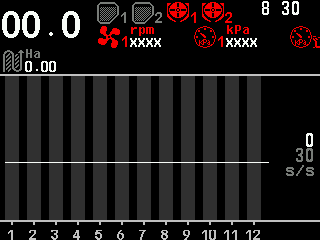
The home screen while the concentrator is unplugged: dispensers, fan and pressure sensors crossed out.
When all devices are done, return to “Operator” — set “User” back in “Settings”, or switch the panel off and on — and reconnect all devices.
Shortcuts
- Hold “MENU” on one of “Channel 1 type” to “Channel 8 type”: all the following channels get the same type, and their addresses are numbered on from this channel.
- Hold “MENU” on one of “Channel 1 address” to “Channel 8 address”: the following channels of the same type are numbered on from this one.
- Hold “MENU” on “Device address”: the panel searches for a concentrator and reads its present channel settings into the menu. Hold it again for the next one.
When you change a channel type, the address of that channel jumps to the first free one of the new type. If two channels of the same type end up with the same address, “Set” refuses with “Invalid profile!”. The other messages: The rules of every configuration.
Something your machine does that this page does not answer? Write to support@agriwelt.com — an engineer answers.