The context menu of a dispenser motor
Every item of the context menu of a dispenser electric motor — what it sets, from which access level it is visible, and what "Reset to defaults" really resets.
On the Motors screen, hold “MENU”, select the motor with “UP” / “DOWN” and press “MENU”. What the menu holds depends on the access level and on the seeding mode of the motor.
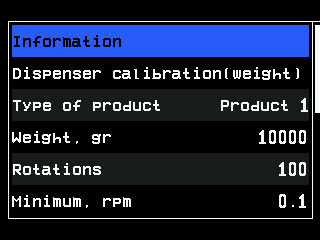
| Item | Level | What it does |
|---|---|---|
| “Information” | Agronomist | Opens the status screen of the motor. |
| “Electric motors” | Service | Opens the service screen of the motors — see The Motors screen. |
| “Dispenser calibration(weight)” | Operator | Starts the calibration by weight. Shown only while the machine stands still. |
| “Type of product” | Agronomist | Which of the three products the motor applies — Assign a product to a motor. |
| “Weight, gr” and “Rotations” | Agronomist | Together they describe the dispenser: this weight of product for this number of shaft turns. Set by the calibration; change them by hand only to copy the values of an identical dispenser. |
| “Minimum, rpm”, “Maximum, rpm” | Agronomist | The permitted shaft speeds. From them the panel works out the travel speeds at which the rate can be applied. The minimum cannot reach the maximum: the panel moves the other value by one step. |
| “Button input”, “Activation signal” | Agronomist | A push-button on the motor controller to run the motor from the machine during calibration. With “Button input” at “No”, calibration is run from the panel only. |
| “Holes in disk” | Operator | The number of cells in the seed disk; from it the panel works out the disk speed. Only in the “Precise” mode. |
| “Numerator”, “Denominator” | Agronomist | The gear ratio between motor and driven shaft, as the machine builder set it. Change it only after the drive has been rebuilt. |
| “Rotation direction” | Agronomist | “Forward” or “Backward”, as the motor is fitted. |
| “Rollback when jammed” | Agronomist | “Yes”: when the dispenser jams, the motor runs back briefly to free it. “No”: the motor is only stopped. |
| “Reset to defaults” | Service | Resets this motor's own settings — see the caution below. |
Further items at the Service level are tools of the service engineer and are not described here.
Weight items only in “Flow” and “Hybrid”. “Dispenser calibration(weight)”, “Type of product”, “Weight, gr”, “Rotations”, the speed limits and the button items appear only if the motor works in “Flow” or “Hybrid”. In “Precise” the rate comes from the seed sensors, there is nothing to calibrate by weight, and “Holes in disk” appears instead.
Taking the motor into or out of control is not in this menu: “PLUS” and “MINUS” on the Motors screen do that.
Something your machine does that this page does not answer? Write to support@agriwelt.com — an engineer answers.