Tramline in the field — bout indicator and next bout
Read the tramline indicator, move to the next bout by hand or let the panel do it from the markers or the implement position, and recognise a line shut off for the tramline.
As soon as “Tramline” is set to “Yes” (Set up the tramline rhythm), the home screen shows the tramline indicator: a wheel-track symbol, and beside it the current bout on top and, smaller, the number of bouts of the rhythm below. With markers in the profile it stands right of the marker indicator.
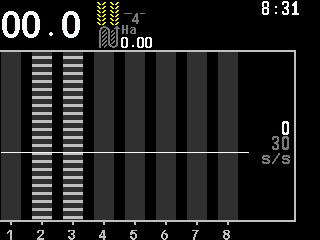
| Symbol | Meaning |
|---|---|
| Grey | The panel moves to the next bout by itself. |
| Yellow | It does not: “Auto-switching” is off, or the machine gives it nothing to switch by. |
| Yellow, alternating with a cross | The machine could switch by itself, but “Auto-switching” is off. |
The columns of the lines shut off are hatched light grey; the flow inside is still shown, hatched: green while it stays below the limit, red above it — and then the panel reports “Seeding to tramline”. The limit is a share of the target rate, “Toler.sowing to tramline,%” of the seed sensor (Sensor settings). Over a sensor that does not answer or is out of control the hatching blinks.
Change the bout by hand
On the home screen, press “BACK”. The bout menu opens. If a rate field is blinking, the first “BACK” only stops the blinking; in the sensor setup mode “BACK” leaves the mode instead.
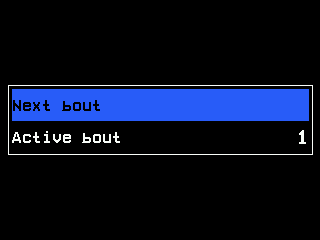
The bout menu. To set a bout, select “Active bout” and change it with “PLUS” / “MINUS”, from 1 to the number of bouts. It is taken over when the menu closes.
To advance one bout, select “Next bout” and press “MENU”. The menu closes. This item is there only when the panel cannot switch by itself.
Where the panel can switch by itself, the menu offers “Auto-switching” instead: “MENU” toggles it between “Yes” and “No”, beeps and closes the menu.
No higher access level is needed for this.
When the panel switches by itself
It needs something that tells it a bout has ended:
| Machine | What ends a bout |
|---|---|
| With markers | A change of the marker position. At least one marker sensor must be under control and answering. |
| Without markers | Lifting the drill out of work. The implement position sensor must be under control and answering. |
| Neither | Nothing — the menu offers “Next bout” in place of “Auto-switching”. |
Besides, “Auto-switching” must be “Yes” and the bout must really have been driven: while the machine moves (without a speed sensor: while it sows), switching is blocked. It is released when the work stops; the next marker change — or lift — then advances exactly one bout.
The actuator itself
Two settings of a tramline actuator are in its context menu (Sensor settings), Agronomist level:
| Item | Values |
|---|---|
| “Cutoff position” | The position in which it shuts off: “Pulled out” (factory setting) or “Pulled in”. |
| “Switch” | When it moves: “when seeding” (factory setting) or “always”. |
Two alarms concern the actuator: “Illegal state” — it reports both end positions at once; “Stall” — it does not reach the position asked. See Tramline alarms.
Something your machine does that this page does not answer? Write to support@agriwelt.com — an engineer answers.