The number pad
How to type a number on the Hectare Mini — what the window shows, which buttons work, and the traps of an empty field and of values outside the range.
Some values can be typed as a whole number instead of being stepped with “PLUS” and “MINUS”. In a menu such a value stands between -[ and ]+; press “MENU” on it and the number pad opens. The pad also opens by itself where steps make no sense — for the weight at the end of a motor calibration, for the number of holes in the disk of a dispenser motor, and for an access code.
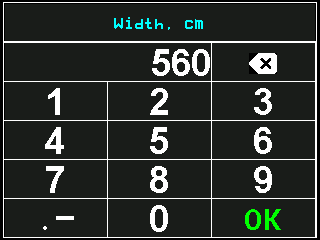
What the pad shows
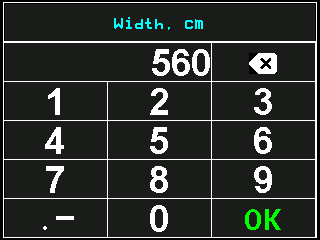
- Name of the parameter, in light blue. In some windows the whole prompt, over several lines.
- The number. It opens with the present value (empty if the value is 0) and grows to the left as you type.
- Backspace. A touch deletes the last character; touch and hold deletes the whole number.
- Digits. Touch them — the digits are typed on the screen only.
- .− key. Sets the decimal point. Touch and hold switches the minus sign, where the value may be negative.
- “OK”, in green. Accepts the number and closes the pad.
A touched key does not light up. You see that the touch has arrived by the number, and you hear it if the button sound is on.
Typing a number
On a menu item whose value stands between -[ and ]+, press “MENU”. The pad opens.
Touch and hold the backspace. The old value is cleared.
Touch the digits. Each joins the number on the right.
If the value has tenths, touch .− and type the places after the point.
Check the number, then touch “OK” or press “MENU”. The pad closes and the menu shows the new value.
“BACK” leaves the pad without changing anything. The other buttons and a touch outside the keys do nothing.
Rules of the pad
- The point works only where the value has tenths, for example “Minimum, rpm” and “Maximum, rpm” of a dispenser motor. For whole numbers the .− key does nothing.
- One point per number. A second touch of .− does nothing until you delete the first point.
- The places after the point are limited to what the value knows. Type fewer and the panel adds zeros: with one place, 12 becomes 12.0.
- The length is limited by the width of the field. When it is full, further digits do nothing.
Something your machine does that this page does not answer? Write to support@agriwelt.com — an engineer answers.