Take a sensor into or out of control
Switch the watching of a single sensor, motor or actuator off and on with the sensor setup mode — what the panel asks, and when it wants the statistics erased.
A sensor taken out of control is no longer watched: it raises no alarms, and its indicator shows the blinking not-controlled sign. Do it only to keep working with a faulty sensor until it is repaired — and take it back into control afterwards.
On the home screen, hold “MENU” until one device is shown on a white background. The panel is now in the sensor setup mode.
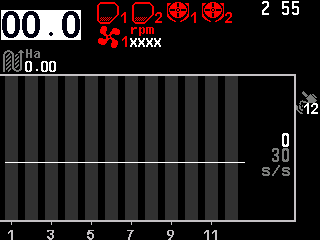
The home screen in the sensor setup mode, the speed indicator selected. Select the sensor with “UP” and “DOWN”. In a diagram, the selected column gets a grey background and a white number.
Press “MINUS” to take it out of control, or “PLUS” to take it back into control.
The panel asks whether you are sure. Press “MENU” for “Yes”, or “BACK” for “No”; the green “Yes” and red “No” on the screen can also be touched.
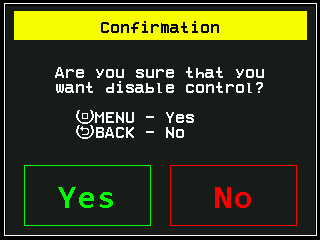
The question before the control of a sensor is switched off. Press “BACK” to leave the sensor setup mode.
The question comes only the first time while you stay in the sensor setup mode. After that, “PLUS” and “MINUS” act on every further sensor without asking, so a whole row of sensors can be switched quickly. After you leave the mode, the panel asks again.
The same works on the rate control screen (hold “MENU”) and, for motors and tramline actuators, on the Motors screen. The control of the speed sensor cannot be switched off.
When the statistics must be erased
If the active field already holds data and the change alters the set of products being applied — possible with motors in the “Flow” and “Hybrid” modes — the panel first asks to erase the statistics of the active field. “Yes” erases them for good; at the Operator level it also asks for the code of a higher access level. To keep the data, select a field that is empty first — see Start a new field.
What the context menu offers
In the sensor setup mode “MENU” opens the context menu of the selected device: its information screen and its parameters, depending on the access level. The parameters of every sensor are in Sensor settings.
Something your machine does that this page does not answer? Write to support@agriwelt.com — an engineer answers.