Change the target rate or the alarm level
Raise or lower the alarm level, the target rate in seeds per metre or the product rate in kg/ha — on the home screen or on the rate control screen.
Every diagram and every product applied by weight has a rate field: the measured value on top, the set value below. What the set value is depends on the mode — see The section diagram:
| Mode | The set value | One step |
|---|---|---|
| “Flow” | Alarm level, seeds per second | 1 s/s |
| “Hybrid” | Target rate, seeds per metre | 1 s/m |
| “Precise” | Target rate, seeds per metre | 0.1 s/m (0.5 to 50.0) |
| Product by weight | Target rate, kg/ha | 0.1 kg/ha up to 50.0, above that 1 kg/ha (1.0 to 999.0) |
| Liquid fertilizer | Target rate, L/ha | 0.1 L/ha up to 50.0, above that 1 L/ha |
On the home screen
Press “PLUS” or “MINUS” once. The rate field used last is selected and blinks; nothing has changed yet.
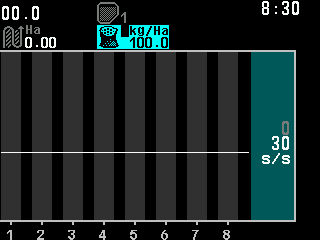
Changing the target rate of a product in kg/ha on the home screen. If the machine has more than one rate field — seed and fertilizer, products by weight — press “DOWN” or “UP” to move to the next or the previous one.
Press “PLUS” to raise the value or “MINUS” to lower it, one step per touch. Holding the button does not repeat it.
Press “BACK” to finish, or simply wait: five seconds after the last touch the field stops blinking. The new value is in force.
In the “Precise” mode the panel also shows, while you change the target, the same rate as a population in ks/Ha and as the spacing between seeds in centimetres.
On the rate control screen
Press “PLUS” or “MINUS”. The target selected last is highlighted — dark blue-green background, yellow value; after switch-on, “Product 1”. The first press changes nothing.
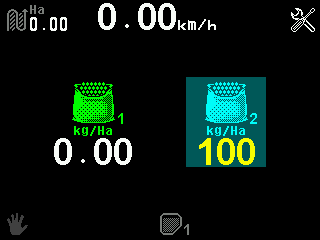
The rate control screen with Product 2 selected for a change. Move to the target you need with “UP” and “DOWN”.
Set the value with “PLUS” and “MINUS”.
Press “BACK”. The highlight goes; the indicators show the applied rates again.
Coming down from above 50.0, a product or liquid rate stops exactly at 50.0; the next touch takes it below, in steps of 0.1. The seed target in the “Precise” mode is one number for all seed sensors: the home screen and the rate control screen change the same value, and there is no menu item for it.
The value is stored by itself about one and a half seconds after the last change; wait that long before switching off.
Something your machine does that this page does not answer? Write to support@agriwelt.com — an engineer answers.