Change the target rate
Raise or lower the rate the panel holds and guards, from the home screen, while seeding — with the buttons or by touch.
The rate field at the right of each diagram shows two numbers: the measured rate on top, the target below it. In the “Flow” mode the target is the alarm level of the diagram — see The section diagram.
With the buttons
On the home screen, press “PLUS” or “MINUS” once. A rate field is selected and starts to blink; nothing has changed yet.
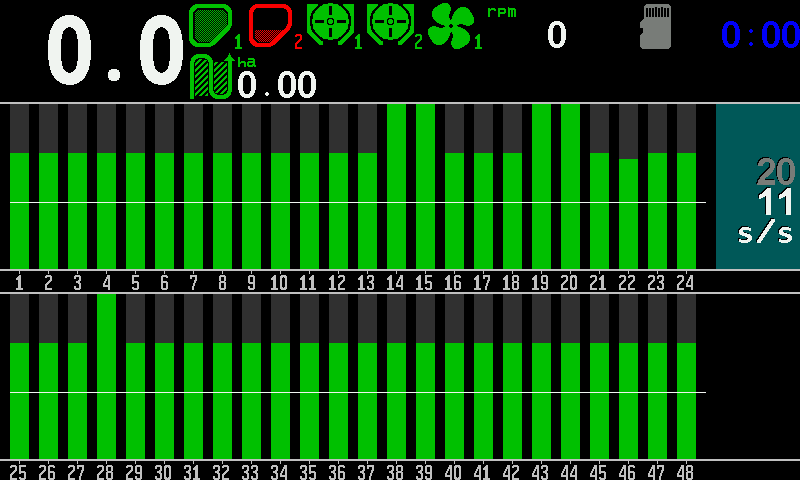
The rate field at the right selected for editing: lit background, target in white. Press “PLUS” to raise the target or “MINUS” to lower it, one step per press.
If the machine has more than one rate field — seed and fertilizer, or products by weight — press “DOWN” or “UP” to move to the next or the previous one.
Press “BACK” to finish. The field stops blinking and the new target is in force.
By touch
Touch and hold the rate field of a diagram. It lights up.
Swipe up over the screen to raise the target, down to lower it — one step per swipe.
Touch the screen outside the diagrams to finish.
For a product applied by weight, touching and holding its kg/ha indicator opens the number pad instead: type the target and touch “OK” (Entering numbers). On the second home screen, touch and hold the rate, then swipe.
Something your machine does that this page does not answer? Write to support@agriwelt.com — an engineer answers.