Move to the next tramline bout
How the bout changes by itself at the headland, what it needs to do so, and how to change or correct it by hand.
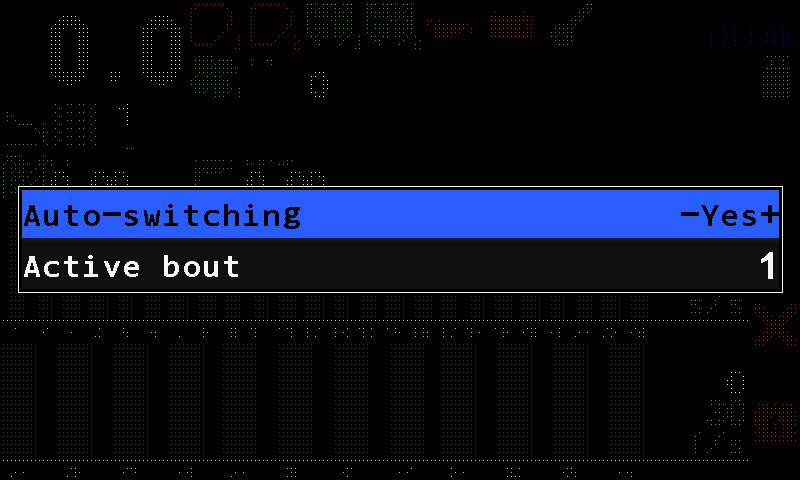
The tramline indicator on the home screen shows the current bout above and the number of bouts in the rhythm below. The bout can change by itself at every turn, or you change it by hand — both from the bout menu, opened with a short press of “BACK” on the home screen.
Automatic change
The panel can change the bout by itself only if something tells it that a bout has ended:
| On the machine | What ends a bout |
|---|---|
| Marker sensors in the profile | At least one marker sensor under control and answering. The change of the marker position ends the bout. |
| No markers | The work position sensor, under control and answering. Raising the implement out of work ends the bout. |
| Neither | Automatic change is impossible. Change the bout by hand. |
On top of that, “Auto-switching” must be “Yes”, and the machine must actually have been applying and then stopped. All of it together — otherwise the bout stays where it is. When the bout cannot change by itself, the tramline icon on the home screen is yellow (Tramline bout).
On the home screen, press “BACK”. The bout menu opens.
On “Auto-switching”, choose “Yes” with “PLUS”.
Press “BACK” to close the menu.
By hand
What the bout menu offers depends on the machine:
- Without a sensor that can end a bout, it offers “Next bout”. Select it and press “MENU”: the bout moves on by one and the menu closes. Do it at every turn.
- With such a sensor, it offers “Auto-switching” instead. To correct the count — after a missed turn, say — set “Active bout” with “PLUS” / “MINUS”; the new bout takes effect when you close the menu.
“Active bout” is in the menu on every machine. Check the indicator on the home screen before you start a pass.
The rhythm itself is set up in Set up the tramline rhythm.
Something your machine does that this page does not answer? Write to support@agriwelt.com — an engineer answers.