The Motors screen
The dispenser electric motors and the tramline actuators of the machine, one tile each — how to read a tile and how to reach a motor's settings.
The Motors screen shows the dispenser electric motors of the machine, one tile each, and the tramline actuators if the machine has any. Look here when a row stops sowing and you want to know whether the motor is the reason.
It exists on any machine whose profile holds at least one electric motor or one tramline actuator. Reach it with “HOME” from the Statistics screen; leave it with “HOME” or “BACK”.
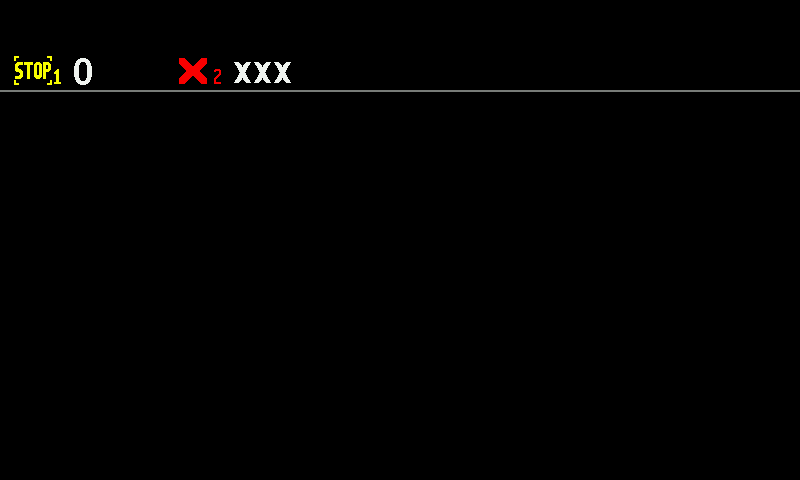
- Motor 1, STOP. Yellow — the motor is serviceable, but product application is not running.
- Value of motor 1. The driven shaft speed in rpm, or seeds per metre in the “Precise” mode.
- Motor 2, red ×. No connection to this motor.
- XXX. No value, because the motor does not answer.
Reading a tile
The colour of the symbol is the state. The value beside it is the driven shaft speed in rpm — or, in the “Precise” control mode, the seeds per metre measured by the seed sensor of that row.
| Symbol | Value | State |
|---|---|---|
| Motor, green | the figure | Normal. The motor is under control and driven. |
| STOP, yellow | the figure | The motor is serviceable, but product application is switched off. Nothing is wrong with it — the system is simply not applying. |
| Motor, red | the figure | The motor is in an alarm state. Read the alarm for the reason: Motor controller alarms. |
| ×, red | XXX | No connection. Check the cable and the connector first. |
| ?, red | ??? | The panel cannot tell what this device is: another kind of device answers in its place, or the controller has stayed in its firmware update mode. |
| !, outlined | !!! | The motor is taken out of control by the operator. It is neither driven nor watched. |
Tramline actuators
| Actuator symbol | State |
|---|---|
| Pulled in or pulled out, green | The actuator has reached its position. |
| Pulled in or pulled out, yellow | The actuator is moving to that position. |
| Alternating between in and out, yellow | The panel cannot tell the actuator's position. |
| Blinking red | The actuator is in an alarm state: Tramline alarms. |
| Blinking red × or ? | No connection, or a device of the wrong kind. |
| Blinking white | The actuator is taken out of control. |
Working with the screen
| What you want | Button | Or gesture |
|---|---|---|
| The settings of one motor | — | Touch and hold its tile |
| Back to the Statistics screen | — | Swipe right |
| Back to the home screen | “HOME” or “BACK” | Swipe left |
The long press opens the context menu of the motor you pressed. The same menu is reached from the home screen, but here you see every motor of the machine at once and can choose the one that misbehaves. See Dispenser motor settings.
Something your machine does that this page does not answer? Write to support@agriwelt.com — an engineer answers.