Motor controller diagnostics
How to read what a metering motor controller reports about itself on the Motors screen — speed, error code, voltages, temperature, current, status bits and fault counters.
The Motors screen is also the diagnostic screen of a motor controller. It shows, live, what the controller reports about itself. Open it with “MENU” → “Service” → “Electric motors” (“Service” level). The working view of the same screen is described in Motors screen.
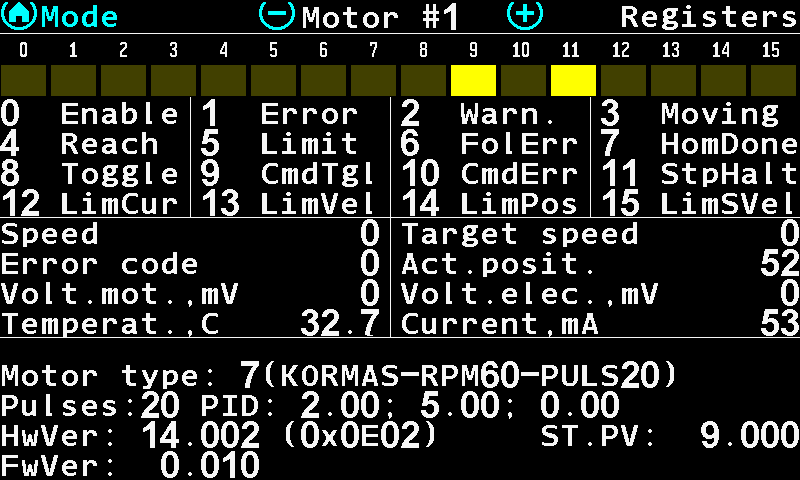
- “Motor #1” — which motor is shown. (−) / (+) step to the previous / next motor.
- “Registers” — the name of the page.
- The status word — sixteen bits of the controller; a lit (yellow) cell is a bit that is set.
- The legend of the bits — the number and the name of each bit. Table below.
- “Speed” / “Target speed” — what the shaft is doing against what the panel asked for. A gap that does not close is the first sign of a load the motor cannot carry.
- “Error code” / “Act.posit.” — the controller's own error number (codes), and the position it counts itself at.
- “Volt.mot.,mV” / “Volt.elec.,mV” — the voltage at the motor and at the electronics, in millivolts. A motor voltage far below the electronics voltage means the supply sags under load.
- “Temperat.,C” / “Current,mA” — the controller's temperature and the current it draws. Compare the current with “I_hilo,A” set for this motor (Configure the motor controllers).
The status bits
| Bit | Name | Bit | Name |
|---|---|---|---|
| 0 | Enable | 8 | Toggle |
| 1 | Error | 9 | CmdTgl |
| 2 | Warn. | 10 | CmdErr |
| 3 | Moving | 11 | StpHalt |
| 4 | Reach | 12 | LimCur |
| 5 | Limit | 13 | LimVel |
| 6 | FolErr | 14 | LimPos |
| 7 | HomDone | 15 | LimSVel |
The legend is drawn in English on every panel, whatever its language: it is a bit map of the controller, not a message to the operator.
The fault counters
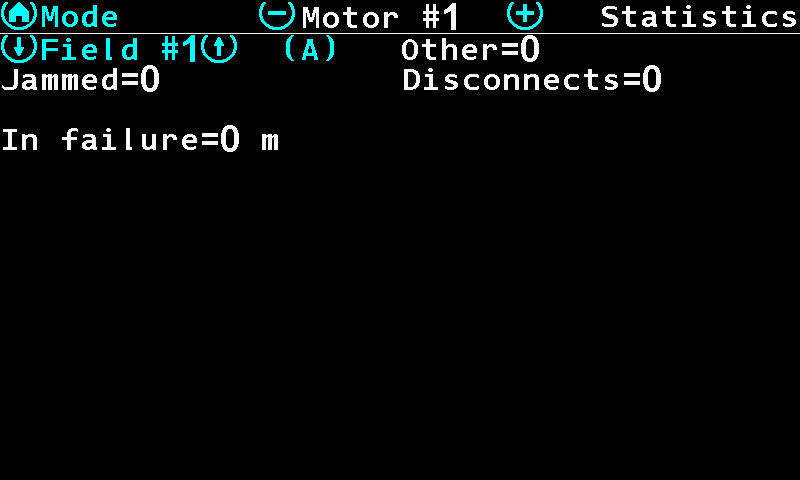
The faults this motor has collected on the chosen field — they are part of the field statistics, not of the motor:
| Counter | What it counts |
|---|---|
| “Jammed” | The rotor stalled and the controller had to give up or back off. |
| “Disconnects” | The controller stopped answering. |
| “Other” | Everything else the controller reported, overcurrent and overtemperature included — they have no counter of their own. |
| “In failure” | The distance in metres this motor spent in a fault state. |
Each counter is white at zero and red once it is not. A red figure does not mean the motor is faulty now — it means it was, somewhere on this field, and the seed placed there is worth a look.
Something your machine does that this page does not answer? Write to support@agriwelt.com — an engineer answers.