How alarms work
When the Hectare One raises an alarm, what the alarm window shows, how to close it, and how to use the alarm topics of this manual.
An alarm is a window that opens over the working screen, with a warning tone. It tells you that one device — a sensor, an actuator, a motor controller — or the system as a whole has found a fault. The alarm topics in this section are grouped by the device that raises the alarm. Look for the words you see on the screen, not for a description of them.
When the panel raises an alarm
A fault is not reported the moment it appears. The condition must hold without a break for the time set in “Alarm delay” before the alarm window opens.
| Setting | Value |
|---|---|
| Where it is set | “Settings” menu, item “Alarm delay”. Available at the “Operator” access level. See The Settings menu. |
| Range | 2 to 20 seconds, in steps of 1 second. |
| Default | 3 seconds. A value outside the range is reset to the default by itself. |
A short delay makes the panel react quickly, but also to brief disturbances — a single bump, a momentary gap in the seed flow. A long delay keeps the screen quiet, but a real fault can run for up to twenty seconds before you are told.
Two cases do not follow the delay:
- Lost communication is counted in polls, not in seconds. “Connection lost” appears after three polls in a row without an answer from the device.
- Right after a sensor has been set up, its alarms are not processed for a short blocking period. This prevents a burst of alarms while a device is being configured.
The alarm window
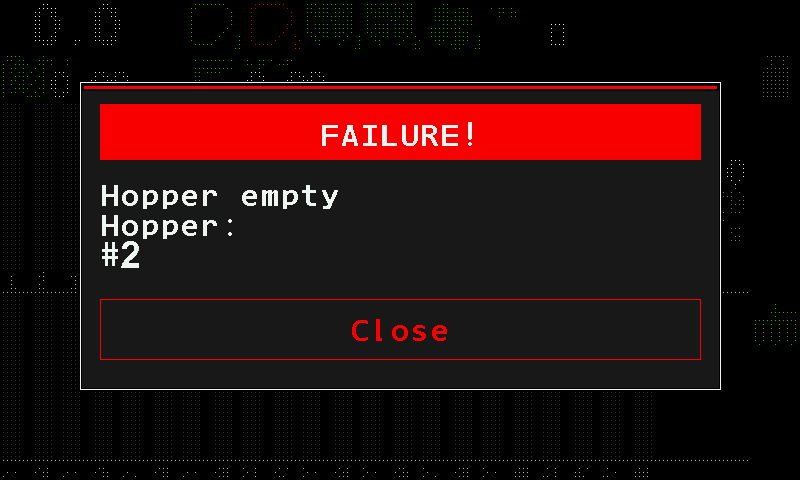
- “FAILURE!” — the title of every alarm window, whatever the fault. It is not the fault itself.
- The alarm text — the fault. Look it up under this text in the alarm topics.
- The kind of device that raises the alarm — here a hopper sensor. The same text can come from different devices; this line tells you which.
- The number of the device — here hopper 2. When several devices of the same kind raise the same alarm, they share one window and are listed together, for example #3-5,8.
- “Close” — closes this alarm. Below.
The alarms of the panel itself carry the line “HOME - close message” in their text instead of a device line. The alarms of the sensors do not.
Closing an alarm
| What you do | What happens |
|---|---|
| Touch the red “Close” button in the window, or press “HOME” | This alarm closes. If more alarms are waiting, the next one opens. While the window is open, “HOME” is the only lit button. |
| Hold “HOME” | Every open alarm window closes at once and the panel returns to the home screen. |
Closing a window does not repair the fault. The alarms of a sensor that are still active are listed on its status screen — see The sensor status screen.
Alarms are hidden at the higher access levels
At the “Agronomist” and “Service” levels alarm windows are not shown. They are not lost: they wait. When you return to “Operator”, the panel drops the ones that have gone away and shows the ones that are still true, one after another. See Access levels.
Not alarms: SLOWER and FASTER
When the travel speed leaves the permitted range, no alarm window opens. The home screen shows “SLOWER” or “FASTER” instead, and keeps showing it while you correct the speed. See Indicators.
How the alarm topics are written
Every alarm has its own heading with the text exactly as on the screen; where the message has two lines on the panel, both lines are given. Under it: what the panel has detected, and what to check, in the order a mechanic checks it — the quick checks on the panel first, then the machine, then the sensor itself.
Something your machine does that this page does not answer? Write to support@agriwelt.com — an engineer answers.