Take a sensor into or out of control
Stop the panel from watching one sensor — a section that is shut off, a broken sensor — and take it back later.
A sensor out of control is not watched: the panel raises no alarm about it, whatever it reports. Take a sensor out of control when its section is out of work on purpose or when the sensor is broken and you must finish the field. Take it back as soon as you can.
Take a sensor out of control
On the home screen, touch and hold the sensor — its column on the diagram, or its icon. Its context menu opens.
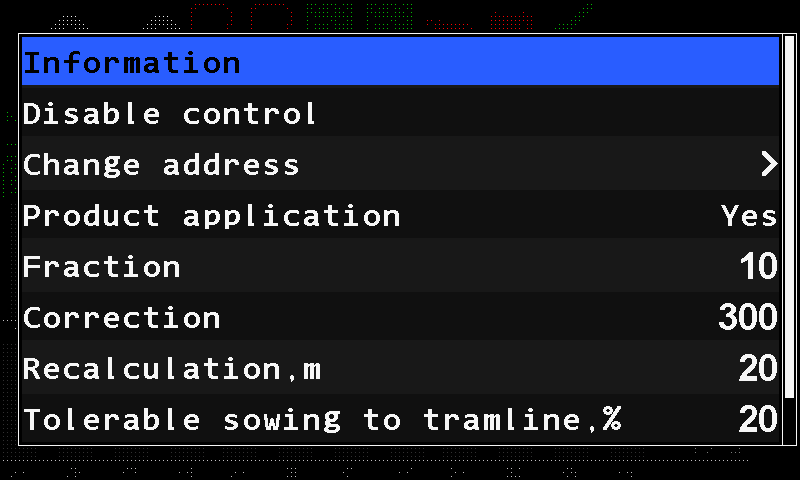
The context menu of a seed sensor. Select “Disable control” with “UP” / “DOWN” and press “MENU”, or touch the item.
The panel asks “Are you sure that you want disable control?”. Touch “Yes”, or press “PLUS”.
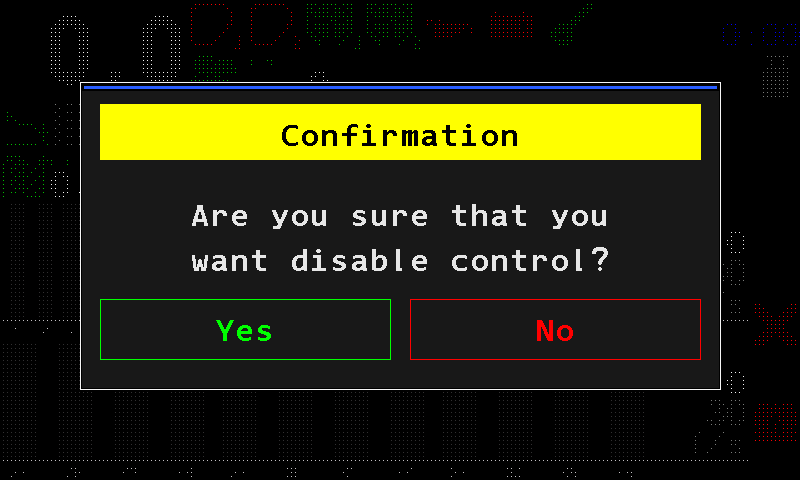
The confirmation before control is switched off. The column turns white with ! (an icon alternates with a white [!]). The sensor is no longer watched.
Take it back into control
Do the same and choose “Enable control”. The panel asks “Are you sure that you want enable control?”; confirm with “Yes”. A seed sensor taken back into control shows a yellow ? for a few seconds while it receives its settings.
When the statistics must be erased
For some sensors the panel first asks to erase the statistics of the active field: it says “Data for the selected field must be erased!” and asks again. “Yes” erases the statistics of the active field — at the Operator level only after the Agronomist PIN — and changes the control; “No” leaves both as they are.
The speed sensor cannot be taken out of control. Motors are taken out of control the same way, from their tile on the Motors screen or with the chevrons on the second home screen. What the four combinations of control and product application mean: The four states of a section.
Something your machine does that this page does not answer? Write to support@agriwelt.com — an engineer answers.