The Service menu
Every item of the "Service" menu, its access level, and which ones an engineer should leave alone.
“MENU” → “Service”. Which items you see depends on the access level (Access levels). The panel has four levels — “Operator”, “Agronomist”, “Service” and “Debug”; “Debug” sits above “Service” and is used at manufacture only.
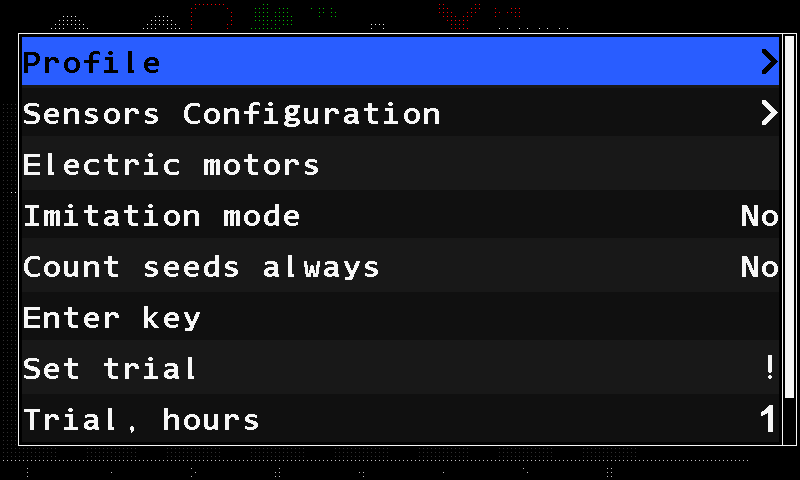
| Item | Level | What it is |
|---|---|---|
| “Profile” | Service | Which devices the machine has, and how many. The profile |
| “Sensors Configuration” | Agronomist | Giving devices their address. Device configuration |
| “Registers” | Debug | A raw register view. Not part of any procedure. |
| “Electric motors” | Service | The metering motor controllers. Configure the motor controllers |
| “Serial number” | Debug | The serial number of the panel, entered once at manufacture. |
| “Count seeds always” | Agronomist | “No” / “Yes” — keep the seed counter running even when the panel would otherwise stop it. |
| “Enter key” | Agronomist | Enters the licence key that takes the panel out of the demonstration state. |
| “Set trial” | Service | Starts the demonstration period. |
| “Trial, hours” | Service | 1 … 999 — how long that period lasts. |
| “Imitation mode” | Service | “No” / “Yes” — the panel works from simulated data. See the warning below. |
| “Display type” | Debug | Which display the firmware drives. Set at manufacture. |
| “Launch updater” | Service | Restarts the panel into the updater to take firmware from the memory card. |
Three further items — the tracker protocol and two switches for logging to the memory card — exist in the firmware but are set never to be shown. They cannot be reached at any level.
“Imitation mode”, “Display type”, “Launch updater” and the two logging switches are shown in English whatever language the panel is set to.
Something your machine does that this page does not answer? Write to support@agriwelt.com — an engineer answers.