Travel speed sensor
The parameters of the travel speed sensor — pulses, wheel diameter, factor, speed limits, imitation, the built-in GPS receiver — and what setting the imitation does by itself.
Everything the panel counts — area, rates, deviations — is worked out from the distance travelled. A speed sensor that is out by a tenth makes every other figure on the panel wrong by a tenth. Set its parameters first, then calibrate it (Calibrate the speed sensor).
Touch and hold the speed field on the home screen to open the context menu of the speed sensor (Sensor settings). All its parameters need the “Agronomist” level (Enable the Agronomist level). The menu also offers “Speed calibration” directly, under “Information”, while the machine stands still.
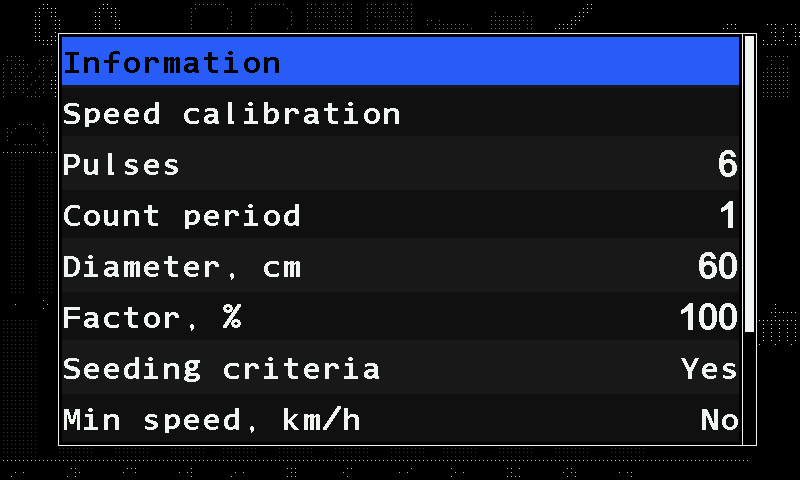
| Parameter | What it does | Range, default |
|---|---|---|
| “Pulses” | The number of pulses the sensor gives per turn of the wheel. | 1 … 1000; 6 |
| “Count period” | The number of pulses the panel averages over before it works out the speed afresh; a sudden change of speed is taken at once. Hidden when the sensor is on an input device. | 1 … 1000; 1 |
| “Diameter, cm” | The wheel diameter. | 10 … 200; 60 |
| “Factor, %” | A correction of the distance per wheel turn: the panel counts the wheel circumference times this factor. 100 takes the circumference as it is. The speed calibration rewrites it. Number pad. | 1 … 10000; 100 |
| “Seeding criteria” | “Yes” — the section alarms are watched only while the machine moves; “No” — also while it stands. Hidden, and always “Yes”, in the “Precise” mode and on a machine with dispenser motors or a pump. | “No” / “Yes”; “Yes” |
| “Min speed, km/h” | Below this speed the home screen shows “FASTER”. “No” (0) switches the check off. | 0 … 99; “No” |
| “Max speed, km/h” | Above this speed the home screen shows “SLOWER”. “No” (0) switches the check off. | 0 … 99; “No” |
| “Imitation, km/h” | A simulated speed. “No” (0) — the real sensor is used. | 0 … 20; “No” |
| “GPS” | Take the speed from an external receiver. Shown only when one is in use. | “No” / “Yes” |
| “Width, cm” | The track between the two wheels of a two-sensor installation. Shown only with “Input device (2)” in the profile. | 0 … 10000; 280 |
| “GPS internal” | Take the speed from the receiver built into the panel. | “No” / “Yes”; “No” |
The minimum must be below the maximum, otherwise the panel raises “Error in settings of Min/Max” (Speed sensor alarms). With “GPS internal” on, the satellite symbol on the home screen shows the reception, and fewer than four satellites raise “Poor GPS signal quality” — see GPS.
The imitated speed is also held inside the range the dosing allows: a value outside it is pulled back to the nearest limit as you set it. While the speed is imitated, the status screen of the sensor shows “IMITATION” in yellow. Working without a speed sensor: Work without the speed sensor.
The status screen
The status screen shows the pulse frequency F= in Hz (with two sensors F1= and F2=) and the two limits in force. See The sensor status screen.
Something your machine does that this page does not answer? Write to support@agriwelt.com — an engineer answers.