The screens
Column colours and the four states of a section
What each colour and symbol of a column on the section diagram means, and the four combinations of control and product application a section can be in.
How the diagram is built — rate line, ticks, control line — is in The section diagram. This page lists what a single column can look like.
Column colours
| What you see | What it means |
|---|---|
| Green column | The row sows normally. |
| Blue column | The row sows more than the target allows (“Precise” and “Hybrid”). |
| Yellow column | The row sows less than the target allows (“Precise” and “Hybrid”). |
| Background blinking dark red, no column | The row sows almost nothing while the machine is seeding — a blocked or empty tube. |
| White column with ! | The control of this section is switched off. Nothing about it is watched. |
| Red × | The sensor does not answer. |
| Red ?, column blinking red | A device of the wrong kind answers in place of this sensor. |
| Yellow ? | The sensor has just received its settings, or it counts seeds but the panel has no speed to judge them by. |
| Grey hatching over the whole column | The section is shut off for the tramline, or its product application is switched off. |
| Green hatching at the bottom of a grey column | A small flow in a shut-off section, still within what is tolerated. |
| Red hatching in a grey column | The shut-off section sows into the tramline. |
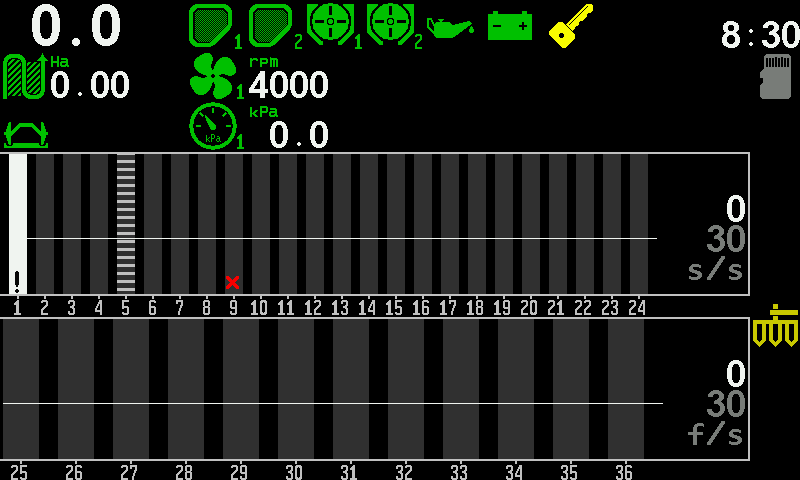
The four states of a section
Each section has two independent switches: whether the panel watches it (control), and whether the machine applies through it (product application).
| Control | Application | What it means | What the column shows |
|---|---|---|---|
| on | on | Normal work. | The normal column. |
| on | off | The row deliberately does not sow — a tramline row — and the panel knows it. | Grey hatching. |
| off | on | The row sows, but nobody is checking it. | White with ! |
| off | off | The section is out of the work altogether. | White with ! |
Both switches are items of the sensor's context menu — touch and hold the column of the section:
- “Disable control” / “Enable control”, at the Operator level. See Take a sensor into or out of control.
- “Product application”, at the Agronomist level. See Access levels.
Something your machine does that this page does not answer? Write to support@agriwelt.com — an engineer answers.