Configure a tramline actuator controller
Tell an actuator controller which tramline actuator it drives and which marker sensors are wired to it.
The actuator controller carries three things at once — the tramline actuator and the two marker sensors of the bout — and each has its own line. That is why one controller serves an actuator and both markers. Prepare first as in Device configuration: only this controller on the cable, “Agronomist” level.
| Item | What it is |
|---|---|
| “Device address” | Which controller the menu talks to. Leave it at “AUTO”. |
| “Actuator” | The number of the tramline actuator this controller drives, or “No” if it drives none. |
| “Input device, channel 1” | The first marker sensor, or “No”. |
| “Input device, channel 2” | The second marker sensor, or “No”. |
| “Set” | Writes the three lines to the controller. |
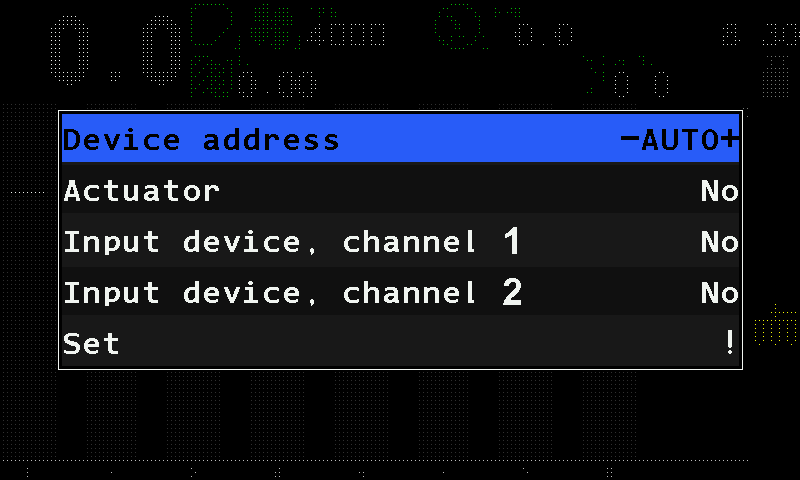
Open “Service” → “Sensors Configuration” → “Tramline actuator” — tap each item twice.
Leave “Device address” at “AUTO”.
Set “Actuator”, “Input device, channel 1” and “Input device, channel 2”: tap each line and swipe right or left to its value.
Tap “Set”, and tap it again. The panel answers “Done”.
Disconnect the controller and connect it again. On the home screen, check that the actuator and the markers appear.
“Set” refuses with “Invalid profile!”, and writes nothing, when all three lines are at “No”, or when both marker channels carry the same number.
When all devices are done, set the level back to “Operator”, or switch the panel off and on. The actuator's own settings: Tramline actuator; the markers: Marker sensors.
Something your machine does that this page does not answer? Write to support@agriwelt.com — an engineer answers.