Dispenser electric motor
The parameters of an electric metering motor — holes in the disk, gear ratio, direction, jam rollback, product, calibration figures, speed window and calibration button — with ranges, defaults and when each is shown.
An electric motor drives a dispenser at the speed the panel works out from the target rate and the travel speed. Touch and hold its tile on the Motors screen or on the second home screen to open its context menu (Sensor settings).
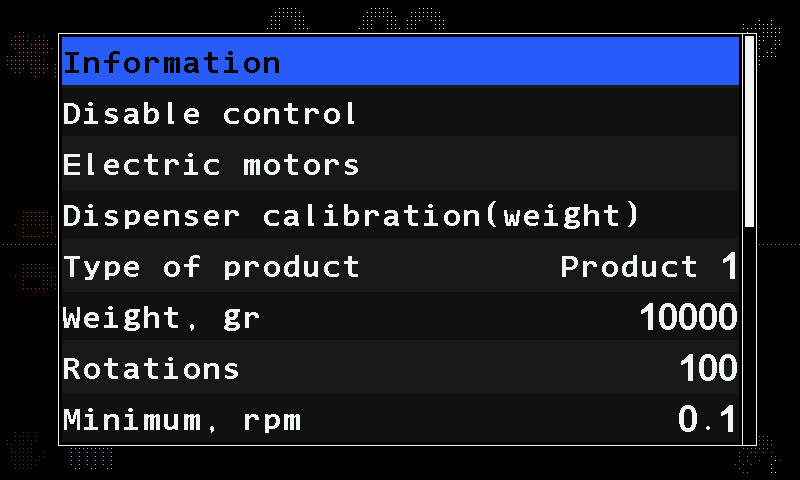
Which items you see depends on the mode of its group: a motor of a group in the “Precise” mode drives a seed disk; in “Flow” or “Hybrid” it meters a product by weight.
| Parameter | What it does | Range, default | Level |
|---|---|---|---|
| “Holes in disk” | The number of holes in the seed disk. “Precise” mode only. | 1 … 200; 27 | Operator |
| “Numerator” / “Denominator” | Together: the gear ratio between the motor and the dispenser shaft. | 1 … 500 each; 10 / 10 | Agronomist |
| “Rotation direction” | The direction the motor turns. | “Forward” / “Backward”; “Forward” | Agronomist |
| “Start delay,mS” | The shortest time, in milliseconds, between the starts of two motors, so that they do not all start at once. | 0 … 500, steps of 5; 30 | Service |
| “Section control D.I.” | An input of the controller that shuts the section off: “Shut off(0)” when the input reads 0, “Shut off(1)” when it reads 1. | “No” / “Shut off(0)” / “Shut off(1)”; “No” | Agronomist |
| “Rollback when jammed” | “Yes” — when the rotor jams, the motor turns backwards for a moment instead of only stopping. | “No” / “Yes”; “No” | Agronomist |
| “Group start address” | Set at commissioning — see Configure the motor controllers. | — | Agronomist |
In the “Flow” and “Hybrid” modes the menu also holds:
| Parameter | What it does | Range, default | Level |
|---|---|---|---|
| “Dispenser calibration(weight)” | Starts the calibration by weight. Shown only while the machine stands still. Calibrate a metering motor by weight | — | Operator |
| “Type of product” | Which of the four products this motor meters. | “Product 1” … “Product 4” | Agronomist |
| “Weight, gr” / “Rotations” | Both set by the calibration by weight. Number pad. | 1 … 65535 each; 10000 / 100 | Agronomist |
| “Minimum, rpm” / “Maximum, rpm” | The shaft speed window the rate control may use, with one decimal place. Number pad. | 0.1 … 500.0 each; 0.1 / 500.0 | Agronomist |
| “Button input” | The input of the motor controller used as a calibration button; “No” — none. | “No”, 1 … 3; “No” | Agronomist |
| “Activation signal” | Which state of that input counts as pressed. | 0 / 1; 1 | Agronomist |
“Minimum, rpm” and “Maximum, rpm” are not a safety limit but the window the rate control works in. The speed window shown on the calibration screen is worked out from them together with the roller figures. “Button input” and “Activation signal” let one person run the motor from the dispenser during the calibration — see Calibrate a metering motor by weight.
The status screen shows “Working” or “Faulty” and the last fault code (Read the fault code of an electric motor). Alarms: Metering motor alarms, Dosing by weight. The controller itself is set up in Configure the motor controllers.
Something your machine does that this page does not answer? Write to support@agriwelt.com — an engineer answers.