Lock product application by hand
Stop all product application with one touch and hold, and start it again — what the lock does and how to see that it is on.
The manual lock stops all product application: the dispenser motors and the pump do not run, however the machine moves. Use it to cross a field already sown, to drive on the road with the implement lowered, or when you work without the speed sensor.
The lock exists on machines with dispenser electric motors or a liquid fertilizer pump.
On the home screen, touch and hold an empty place in the right-hand column of indicators — not on an icon — until the panel beeps once.
Check the right-hand column. A yellow hand blinks there: application is locked.
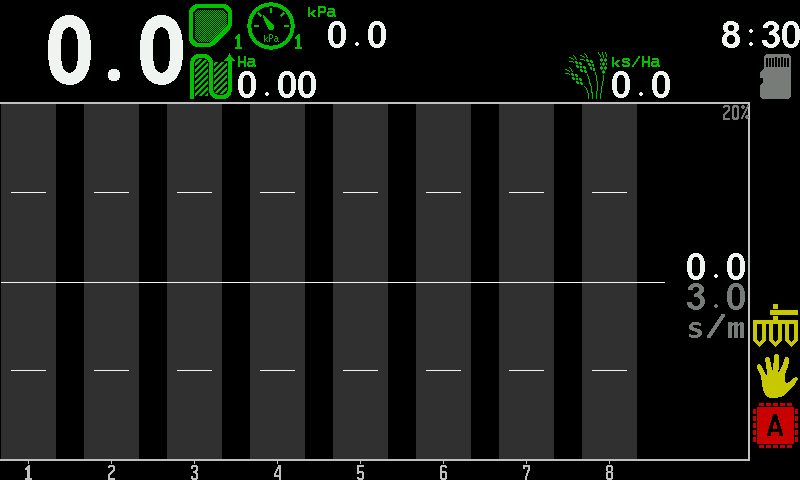
The right-hand column of the home screen with the yellow hand. To unlock, touch and hold the same place again. One short beep; the hand disappears.
A touch and hold on an icon of the column opens the context menu of that device instead.
On the second home screen, touch and hold the stop symbol — the same lock, the same beep.
What the lock changes elsewhere
- The motor tiles on the Motors screen show a yellow STOP — serviceable, not applying.
- The product application control does not start when you move off — the lock must be off for the control to start (Quick start).
- The work done while locked is counted in the statistics as “Work without alarms control” (Statistics).
When the panel locks by itself
Switching speed imitation on locks product application. A panel that is switched on with imitation already on starts locked as well. Unlock by hand when you are ready to apply: Work without the speed sensor.
Something your machine does that this page does not answer? Write to support@agriwelt.com — an engineer answers.