Configure a HUB8
Tell a HUB8 input device — "Concentrator-8" on the screen — what is wired to each of its eight channels.
The HUB8 carries several devices at once. On the panel it is called “Concentrator-8”. Its menu is longer than the others: after the device address come its eight channels, each with a type and a number. Prepare first as in Device configuration: only this HUB8 on the cable, “Agronomist” level.
| Item | What it is |
|---|---|
| “Device address” | Which HUB8 the menu talks to. Leave it at “AUTO”. |
| “Channel 1 type” … “Channel 8 type” | What is wired to the channel: “Seed sensors” or “Input device”. |
| “Channel 1 address” … “Channel 8 address” | Which device of that kind it is: for a seed sensor, the number of its row; for an input device, the value from the data sheet of the system. |
| “Set” | Writes all channels to the HUB8. |
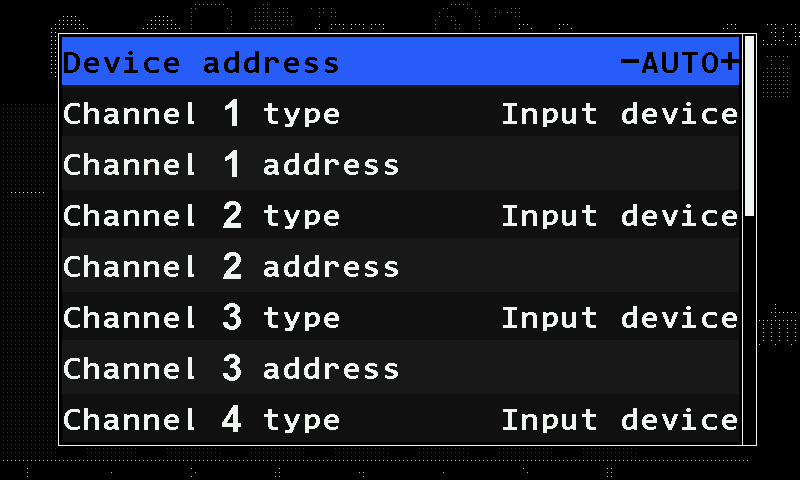
The type and the number together make the device appear on the home screen in the right place.
Open “Service” → “Sensors Configuration” → “Concentrator-8” — tap each item twice.
Leave “Device address” at “AUTO”.
For each channel that carries a device, tap its type item — “Channel 1 type” for channel 1 — and swipe to the type, then tap its address item — “Channel 1 address” — and swipe to the number. Leave a channel that carries nothing as it is.
Swipe up to “Set” at the end of the menu, tap it, and tap it again. The panel answers “Done”.
Disconnect the HUB8 and connect it again. On the home screen, check that each device appears in its place.
Two channels of the same type cannot have the same number: “Set” then refuses with “Invalid profile!” and writes nothing.
When all devices are done, set the level back to “Operator”, or switch the panel off and on.
Something your machine does that this page does not answer? Write to support@agriwelt.com — an engineer answers.