Sensor settings
How to reach the settings of one sensor by touch, what its context menu holds, and which calibrations exist and where.
Every sensor, actuator and motor on the machine has its own settings and its own status screen. Both are reached through its context menu. The parameters of each kind of sensor are in the topics that follow this one.
Reach a sensor
Touch and hold the device for more than half a second:
- on the home screen — its icon, or its column on a diagram;
- on the Motors screen or the second home screen — the tile of a motor or a tramline actuator.
The context menu opens. A short tap does nothing. A touch and hold on a kg/ha indicator, on the target of a diagram or on an empty place of the right-hand column does something else — see Touch zones and gestures.
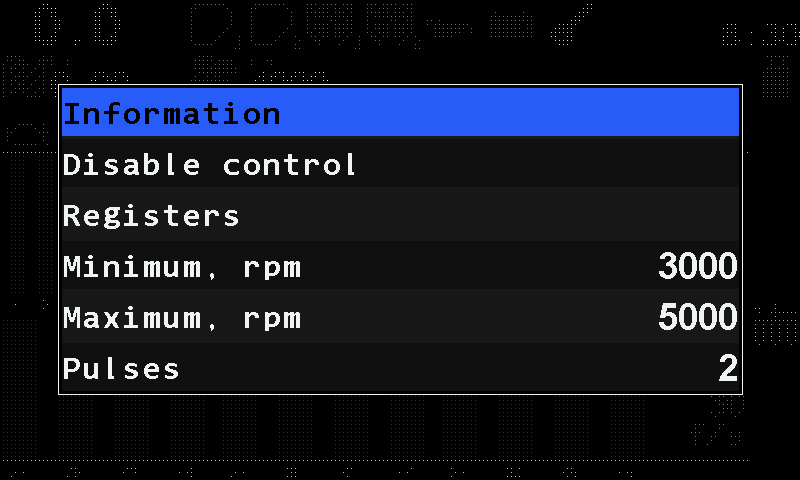
The context menu
| Item | What it does | Level |
|---|---|---|
| “Information” | Opens the status screen of this device. The sensor status screen | Operator |
| “Disable control” / “Enable control” | Takes the device out of monitoring, or back in. Not offered for the speed sensor. Take a sensor into or out of control | Operator |
| “Registers” | A raw view of the device's registers, for the service department. Not part of any procedure. For a motor or the pump controller the item reads “Electric motors” and opens the diagnostic screen of the controllers. | Agronomist |
| The device's own items | For example “Speed calibration” for the speed sensor. | as stated |
| The parameters | Which ones you see depends on the access level. Change the selected one with a swipe right or left. | as stated |
| “Reset to defaults” | Returns this device's parameters to the factory values. | Service |
Tap outside the menu to leave it. Changed values are stored by themselves.
The status screen
“Information” opens the status screen of the device: its identity, its link, its live figures and its active alarms. How to read it: The sensor status screen.
Calibrations
Four calibrations exist. They are not variants of one procedure: each writes different parameters and is reached a different way.
| What it puts right | Where | Level | Machine |
|---|---|---|---|
| Travel speed — rewrites “Factor, %” of the speed sensor. Calibrate the speed sensor | “Settings” → “Seeding machine parameters” → “Speed calibration”, or “Speed calibration” in the context menu of the speed sensor | Agronomist in the menu, Operator in the context menu | drives 100 m |
| Dispenser rotation — “Wheel, pulses” against “Dispenser pulses”. Calibrate the dispenser rotation | “Settings” → “Seeding machine parameters” → “Dispenser calibration” | Agronomist | wheel and dispenser shaft turned together |
| Dispenser mass — “Weight, gr” and “Weight, pulses”. Calibrate the dispenser by weight | context menu of the dispenser sensor | Operator | standing |
| Metering roller mass — “Weight, gr” and “Rotations” of one motor. Calibrate a metering motor by weight | context menu of the dispenser electric motor | Operator | standing |
The context-menu items “Speed calibration” and the motor calibration are offered only while the machine stands still. The two mass calibrations are at the “Operator” level because they have to be repeated whenever the product changes.
Something your machine does that this page does not answer? Write to support@agriwelt.com — an engineer answers.